
Table of Contents
Organizations pour enormous resources into collecting data — and nowhere near enough into protecting it. Yet the storage medium, the file format, and the absence of a coherent backup strategy can inflict exactly as much damage as a sophisticated cyberattack. Data has become the fuel of the modern economy. Enterprises accumulate it voraciously: to understand customers, sharpen business decisions, fine-tune advertising. And increasingly just-in-case, because nobody knows what tomorrow’s use cases will demand. The generative AI training wave has opened an entirely new chapter in this collective data hunger. Governments build public policies on data. Cultural institutions treat it as a knowledge treasury for future generations.
Almost everyone collects data. Almost nobody asks the important questions: How long can it survive before becoming unreadable or irrelevant? Who — or what — is its greatest enemy?
The answers are not simple. Data longevity depends on a fragile interplay of factors: the medium it lives on, environmental conditions, management procedures, and plain human error. Data disappears in server-room fires, during OS upgrades, and sometimes after nothing more dramatic than clicking “Delete.”
A Week, a Decade, Half a Century: How Long Does Enterprise Data Actually Live?
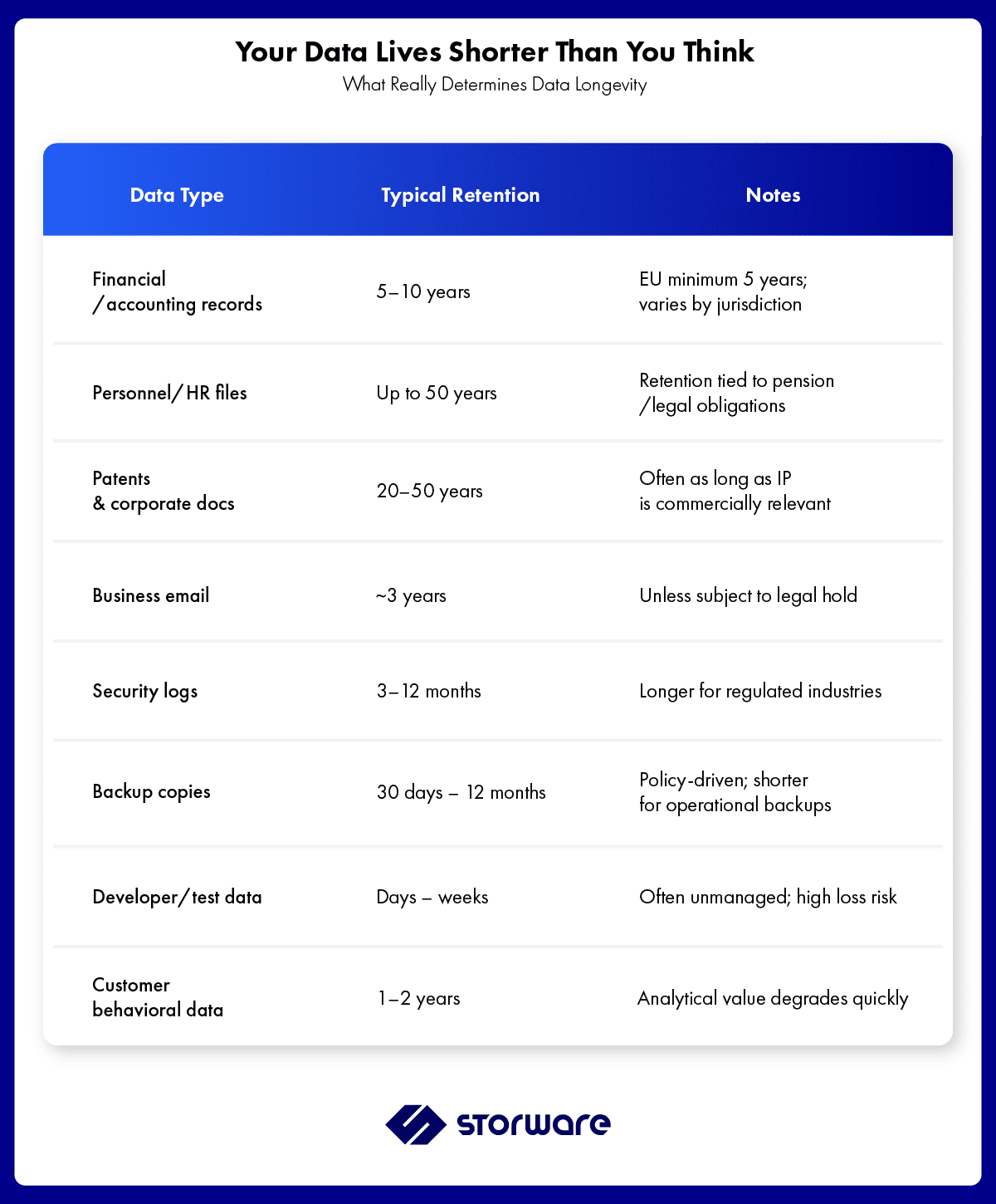
Data retention in organizations is not a single number — it is a spectrum that stretches from weeks to half a century. Financial records in the EU must survive a minimum of five years; personnel files up to fifty. Patents and corporate governance documents can span decades. Business emails average around three years. Security logs and backup copies are typically retained for just a few months, while developer scratch data often lives no longer than a few weeks.
Separate from compliance-driven retention is the question of analytical value. Customer behavioral data begins losing its predictive power after roughly two years. Market trend analysis requires at least a three-year window to remain meaningful. But the most demanding challenge of all sits at the boundary between business and history.
Cultural heritage — manuscripts, photographic archives, audiovisual materials, 3D models of monuments — requires something no SLA can guarantee: authentic accessibility across centuries. Paradoxically, stone tablets have survived three thousand years; cutting-edge storage media can fail inside a decade.
Typical Enterprise Data Retention Reference
HDD, SSD, or Tape: Which Storage Medium Actually Stands the Test of Time?
Storage vendors have been arguing about the future of media for years. Some declare HDDs obsolete — VAST Data built its entire architecture without spinning disks as a primary tier. Pure Storage has been predicting the imminent death of mechanical drives for at least a decade. Those predictions keep failing to materialize.
Hard Disk Drives (HDD): The Bathtub Curve Reality
The latest forecasts from Futuresource Consulting project that HDD-to-SSD shipment ratios will sit at roughly 60:40 in 2025, and even by 2030 mechanical drives are expected to hold around 44% of market volume. Price and proven longevity keep them competitive.
Drive manufacturers publish MTBF figures between 1 and 2.5 million hours, but those are statistical constructs, not guarantees. Backblaze’s ongoing fleet data — derived from hundreds of thousands of drives in production — paints a more nuanced picture: the “bathtub curve.” Infant mortality claims weakly manufactured units in the first few months. A stable middle period then follows, lasting up to seven years under moderate workloads. After that, wear-out failures accelerate. Practical safe horizons: 3–5 years under heavy I/O; up to 7–10 years for archival workloads with infrequent access.
SSDs: TBW Endurance and the QLC Caveat
For NAND flash, the critical longevity metric is TBW (Terabytes Written) — the total write volume the drive can sustain before statistically hitting its wear limit. Enterprise deployments today are heavily weighted toward QLC (Quad-Level Cell) NAND, which packs four bits per cell and delivers excellent density. The trade-off: QLC enterprise drives typically offer 1,000–3,000 TBW at 4–8 TB capacities, often translating to less than one full drive-write per day. That makes QLC well-suited for read-dominant workloads — archives, object repositories, streaming platforms, and, critically, backup landing zones — but a poor choice for high-churn transactional storage.
Magnetic Tape: Repeatedly Buried, Stubbornly Alive
Tape has been declared dead more times than enterprise Java. It refuses to comply. Stored under proper environmental controls — stable temperature, 20–40% relative humidity — modern LTO tape cartridges retain data reliably for 15–30 years. Infrequently accessed cartridges age even more slowly. Most critically for ransomware defense, LTO tape supports WORM (Write Once, Read Many) locking, making it a natural air-gap endpoint between active backup and long-term archival.
The caveats are real: tape is a delicate polymer strip coated in magnetic oxide. It is vulnerable to mechanical stress, strong magnetic fields, and environmental extremes. Excessive humidity triggers the “sticky shed syndrome” in which the oxide layer separates from the substrate. Tape rewards careful stewardship — and punishes neglect.
Glass and Film: Storage Media Designed for Millennia
The last several years have produced genuinely revolutionary archival storage concepts. Microsoft’s Project Silica stores data in quartz glass using femtosecond lasers. Glass tolerates temperatures from −273°C to 300°C, survives prolonged acid baths, and shrugs off gamma radiation. Estimated longevity: up to 10,000 years. German firms Cerabyte and Ewigbyte are developing competing approaches to ceramic and glass-based storage. Warner Bros. partnered with Microsoft to store the 1978 Superman film as a proof of concept.
Norwegian firm Piql offers another angle: photosensitive 35mm film cartridges holding approximately 120 GB each, designed for institutional archivists rather than mass-market deployment. The Vatican Library, Czech Radio, and the National Archive of Mexico already rely on Piql media for preservation of irreplaceable materials.
The Biggest Threat to Your Data? Not Hardware Failure — Technology Obsolescence
This is the part that catches most organizations off guard. Data can become completely unreadable not because the medium degraded, but because the ecosystem needed to interpret it no longer exists.
The 5.25-inch floppy disk is the canonical example: physically intact, practically useless — finding a working drive and controller is nearly impossible. Interface evolution tells the same story: SCSI gave way to IDE, IDE to SATA, SATA to NVMe. Entire generations of drives became incompatible with modern motherboards. And software formats compound the problem: vendors routinely abandon support for legacy formats, and commercial software lock-in means a vendor’s bankruptcy or a deliberate end-of-life decision can strand your data permanently.
Technology obsolescence forces periodic data migration — and every migration carries serious risk. Format conversion almost always threatens metadata integrity, document layout fidelity, and data structure validity. The act of saving data can become the cause of losing it.
Backup vs. Archival: Two Different Answers to the Same Question
The terms are used interchangeably in most organizations — incorrectly. Backup is “right now and recently”; archival is “always and for years.” They serve different purposes, operate on different timescales, and require different infrastructure. But backup has a direct and underappreciated impact on long-term data durability.
Drives fail. A solid backup strategy ensures you are never a hostage to a single device. An offline backup copy acts as a shield against ransomware — encrypted data on the primary system cannot reach an air-gapped or immutable copy. The foundational strategy for most organizations remains the 3-2-1 rule: three copies of data, on two different media types, with one copy offsite. For regulated or high-risk environments, the extended 3-2-1-1-0 rule adds an immutable copy and mandates zero errors on the most recent tested restore.
Backup also enables proactive integrity checking. Comparing checksums between the original and backup copies allows silent data corruption — bit rot — to be caught and repaired before any user attempts to access the file. Without regular backup and checksum verification, bit rot can silently destroy data for months or years before anyone notices.
That said, backup guarantees bit survival — not interpretability. Archival must go a step further, actively managing technology aging through format migration or environment emulation. LTO tape has served both roles simultaneously for decades, bridging operational backup with durable archival in a single medium.
How Storware Backup and Recovery Addresses Data Longevity in Practice
At Storware, we build software for environments where data protection complexity is not a theoretical concern — it is an operational reality. Storware Backup and Recovery was designed from the ground up to give IT architects genuine control over where data lands, how long it stays, and what prevents it from being compromised or quietly corrupted.
- Immutable backup storage: Backup data stored to immutable destinations cannot be altered or deleted by ransomware, a misconfigured retention policy, or an insider threat. This makes immutability the most direct technical answer to the ransomware data-destruction problem.
- Flexible backup destinations: Storware supports a wide range of backup destinations — filesystem-based (XFS, NFS 4.2, ZFS), object storage (S3-compatible, Azure Blob), Seagate Lyve Cloud, Vawlt, tape pools, and more. Matching the right storage tier to the right backup retention window is a first-class configuration decision, not an afterthought.
- Policy-based retention automation: Retention policies in Storware Backup and Recovery are granular and schedule-driven. Organizations can configure different retention windows for hourly snapshots, daily incrementals, weekly synthetics, and monthly fulls — mapping directly to compliance-driven retention requirements without manual intervention.
- 3-2-1 and 3-2-1-1-0 architecture support: The platform is built to implement multi-destination strategies natively. Primary backup, offsite copy, and immutable copy can all be managed from a single policy, ensuring the backup topology matches the data’s risk profile.
- Instant Restore for minimal RTO: Long-term data durability is only useful if you can actually get data back when needed. Instant Restore allows VMs to be mounted and booted directly from the backup repository — without waiting for full data rehydration — reducing RTO to minutes for critical workloads.
- Recovery Plans for DR automation: For organizations managing complex multi-VM environments, Recovery Plans automate failover sequencing, network remapping, and recovery validation. Scheduled test executions verify that your recovery strategy works before a real incident forces the question.
Importantly, Storware is licensed universally — a single license covers all supported sources, whether proprietary hypervisors or open-source platforms. That means your backup topology can evolve as your infrastructure evolves, without renegotiating licensing every time you add a new platform to your estate.
Frequently Asked Questions
How long does enterprise data typically last on an HDD?
Under heavy workloads, HDDs have a practical safe operating window of 3–5 years. For archival use with infrequent access, the window extends to 7–10 years. After that, wear-related failure rates increase significantly.
What is the 3-2-1-1-0 backup rule?
It extends the classic 3-2-1 strategy: three copies of data, on two media types, one offsite — plus one immutable or air-gapped copy, and zero errors on the most recently tested restore.
Is SSD reliable for long-term backup storage?
QLC-based SSDs are well-suited for backup landing zones and read-dominant archives, but their TBW limits make them poor choices for high-write backup workloads. For long-term retention, tape or object storage with immutability features is more appropriate.
What is the biggest threat to data longevity?
In enterprise environments, technology obsolescence — the inability to read data because the hardware interface, file format, or software ecosystem no longer exists — is arguably a greater long-term risk than physical media failure.
How does immutable backup protect against ransomware?
An immutable backup copy cannot be altered, overwritten, or deleted for a defined retention period — not by ransomware, not by a backup administrator, not by a misconfigured policy. This guarantees a clean recovery point exists even after a full encryption attack.
Conclusion: Data Does Not Take Care of Itself
Data collected today can become unreadable tomorrow — not because of hardware failure, but because of the absence of a coherent strategy. Medium selection, backup policy design, format migration planning: these are decisions most organizations defer. The problem is that “later” has a habit of meaning “too late.”
The organizations that get this right are the ones that treat data protection as a continuous architecture discipline — not a one-time deployment. They define retention tiers, enforce immutability where it matters, test recovery plans on a schedule, and migrate formats before the ecosystem around them collapses.
That is exactly the kind of environment Storware Backup and Recovery was built for: complex, heterogeneous, demanding — and worth protecting properly.
Want to see how Storware handles your backup topology?
Book a live demo with one of our engineers and walk through your specific environment — from storage destinations to retention policies to recovery plan testing.