

Disaster Recovery
When systems go down, speed and certainty decide the outcome. Storware turns backups into orchestrated disaster recovery — Recovery Plans that restore whole environments in one action, instant VM restore that boots in minutes, and scheduled testing that proves your RTO before you need it.

Key Highlights

Recovery Plans
Pre-define what recovers, from which backup, and where. Execute a whole-environment recovery in a single action — on demand or on a schedule.
Instant VM restore
Mount backup data directly from the repository and boot the VM immediately, with live storage migration running in the background — RTO in minutes, not hours.
Tighter RPO by design
Platform-native snapshots, scheduled backups, and policy-based SLAs give deterministic control over how much data you could lose.

DR you've actually tested
Schedule recovery tests so you know your plans work — instead of discovering the gaps during a real disaster.
Orchestrated recovery, tested in advance
Recovery Plans
Multiple restores to a target environment with pre-configured settings, executed on demand or on a schedule — your DR runbook, run in one action.
Instant restore with live storage migration
Boot workloads from backup immediately; data migrates to production storage in the background while the VM is already online.
Synthetic full backups for faster restore
Incrementals are synthesized into a complete, independent image — no chain merging at restore time, so recovery scales cleanly across large estates.
Snapshot management for tighter RPO
Platform-native snapshots enable rapid recovery without a full backup import; policy-based SLAs give deterministic recovery granularity.
Scheduled DR testing
Run recovery on a schedule to measure actual RTO and RPO against target and surface issues before a real event.
Cross-platform and file-level recovery
Full VM restore, file-level recovery, and recovery to the same or a different platform — including V2V migration into OpenStack.
Secondary destinations and geographic distribution
Redundant, geo-distributed copies, so losing a site doesn't mean losing your recovery point.
Recovery from clean, protected copies
Recovery Plans draw on immutable, air-gapped backups, so what you restore is trustworthy — see how backups stay tamper-proof.
Technology partners






Orchestrated disaster recovery with Storware
See Recovery Plans restore a whole environment in one action, instant VM restore boot a workload in minutes, and a scheduled DR test validate RTO and RPO.
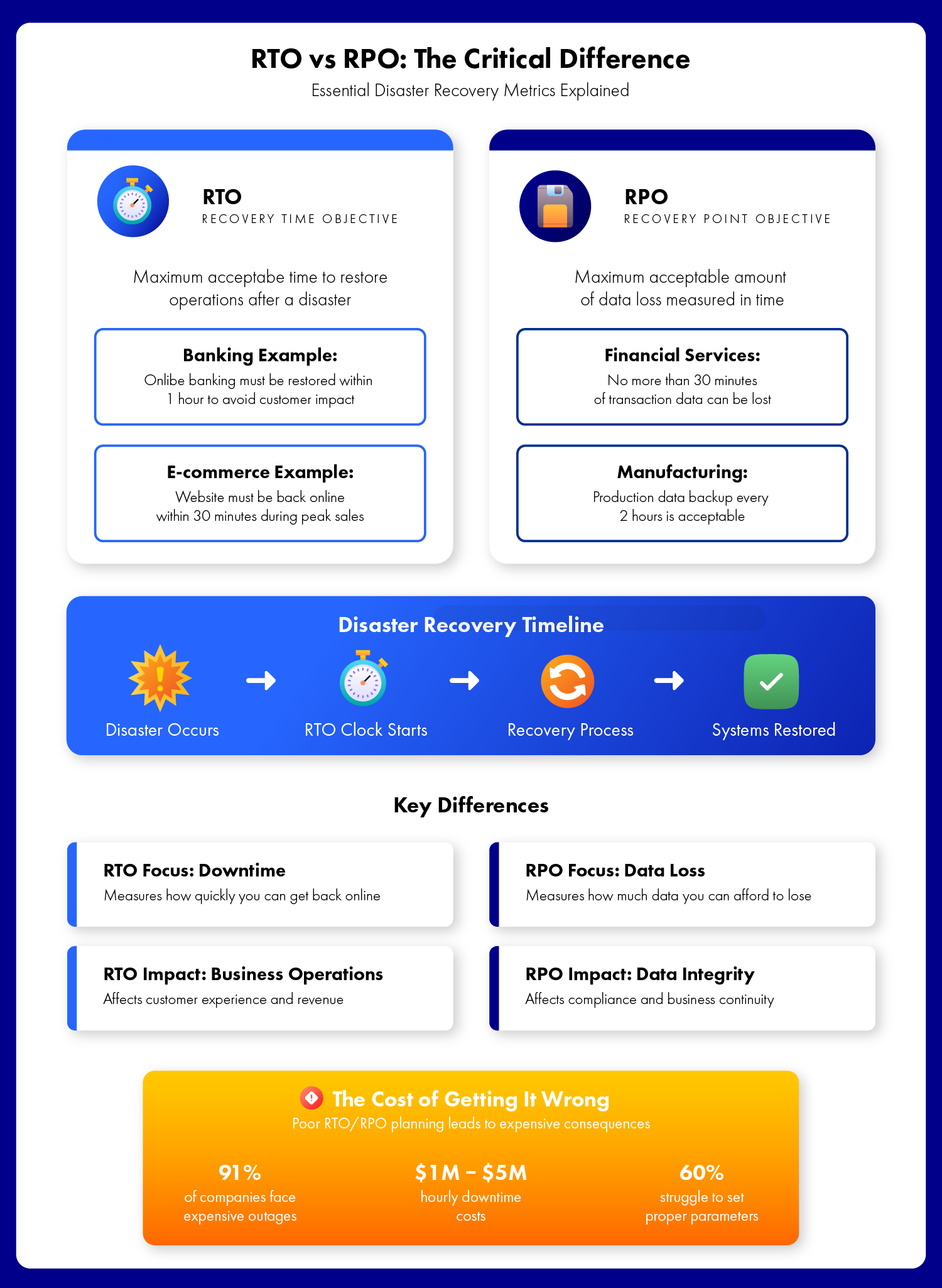
Two numbers decide a disaster: RTO and RPO.
RTO is how long you're down. RPO is how much data you lose. Every DR decision — backup frequency, restore method, distribution — is a trade-off between the two. Storware gives you levers on both.
RTO — how fast you're back
Instant VM restore boots workloads in minutes, and Recovery Plans bring whole environments back in one action. The stopwatch stops sooner.
RPO — how much you lose
Frequent scheduled backups, snapshots, and policy SLAs shrink the window of data at risk to what your business can tolerate.
Proof — that both hold
Scheduled DR testing measures actual RTO and RPO against target, so the numbers are commitments you've verified, not hopes.
What is a Recovery Plan in Storware?
A Recovery Plan defines in advance what should recover, from which backup, and where each workload lands. Once triggered, Storware performs the restores as one action — executed on demand or on a schedule.
What's the difference between RTO and RPO?
RTO (Recovery Time Objective) is the maximum time a system can be down before recovery. RPO (Recovery Point Objective) is the maximum amount of data you can afford to lose. RTO is about speed; RPO is about how recent your last good copy is.
How fast can Storware recover a VM?
With instant restore, Storware mounts backup data directly from the repository and boots the VM immediately, while live storage migration moves data to production storage in the background — putting RTO in minutes rather than hours.
Can I test my disaster recovery without a real disaster?
Yes. Recovery Plans can run on a schedule specifically to test the recovery process, measuring whether RTO and RPO objectives are met and surfacing issues in advance.
Can I recover to a different platform or location?
Yes. Storware supports full VM restore, file-level recovery, and recovery to the same or a different platform — including V2V migration into OpenStack — plus secondary and geo-distributed destinations.
How does Storware help meet a tight RPO?
Through frequent scheduled backups, platform-native snapshots, and policy-based SLAs that give deterministic control over recovery granularity — so the window of data at risk matches what the business can tolerate.
Does disaster recovery work across a multi-platform estate?
Yes. Recovery Plans, instant restore, and testing work across all supported sources — VMs, cloud, containers, storage, and databases — from one platform, under one universal license.
How does disaster recovery relate to ransomware recovery?
A ransomware attack is one disaster scenario. The DR mechanics are the same, with the added requirement of recovering from a clean, immutable copy. See our ransomware recovery guidance for that specific scenario.