
Table of Contents
Welcome to the era when ransomware attacks have evolved from nuisance to existential threat. Nowadays, backup administrators are faced with the question: are traditional data security measures no longer sufficient? According to recent research, 89% of ransomware attacks now target backup repositories, with attackers successfully compromising 73% of those targeted backups. The numbers tell a stark story: only 32% of businesses that paid ransom demands in 2024 successfully recovered their data, down from 54% the previous year. This shift has transformed immutable backups from an optional component of an enterprise’s data protection strategy to a necessity.
What Are Immutable Backups and How Do They Work?
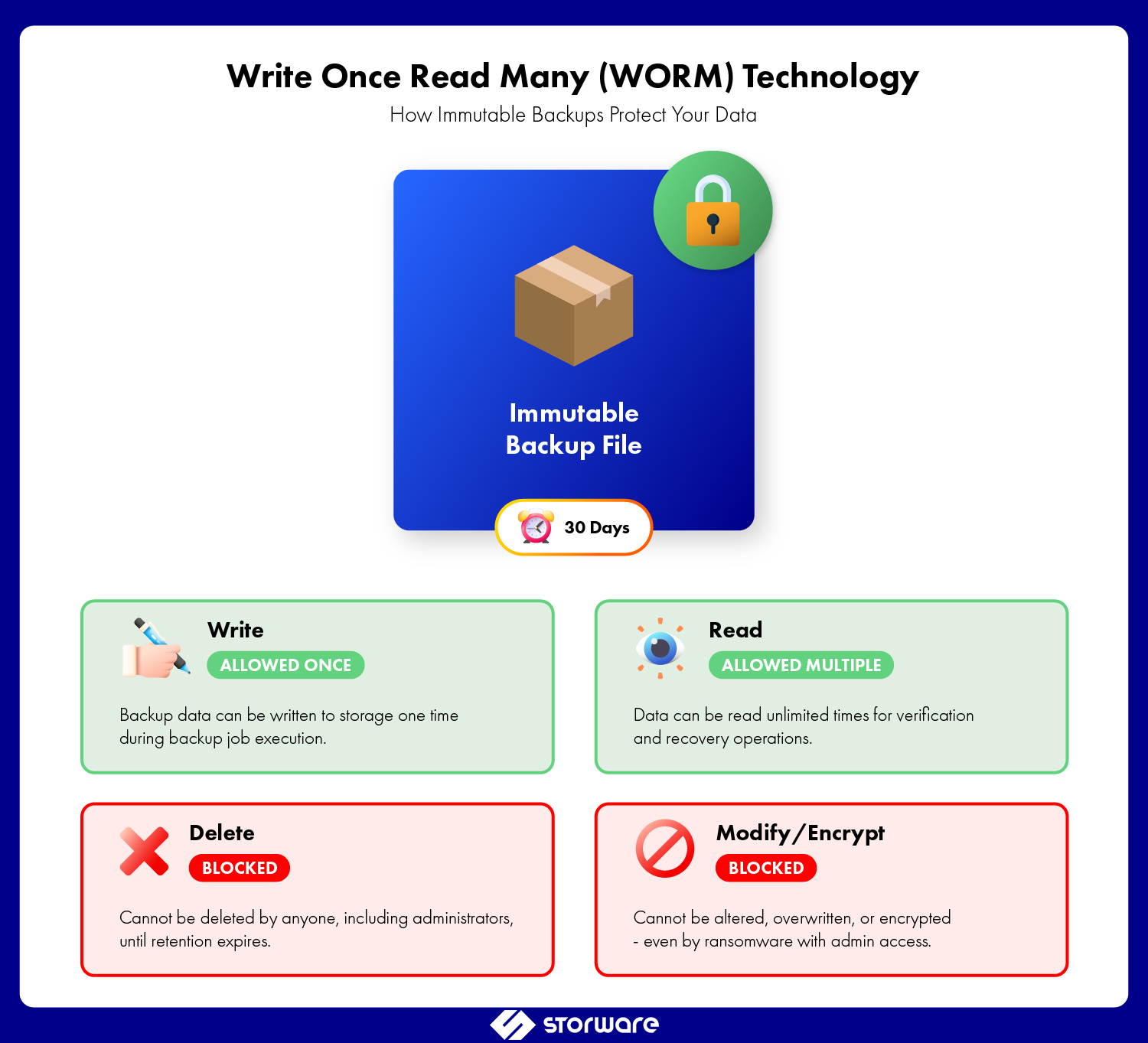
Immutable backups are backup copies that cannot be altered, encrypted, or deleted for a predetermined retention period—even by administrators with full system privileges. The term “immutable” literally means “unchangeable,” and in the context of data protection, it represents a fundamental shift in how we approach backup security.
At the technical level, backup immutability leverages write once read many (WORM) technology. When a backup is written to immutable storage, the storage system enforces strict access controls that prevent any modification operations. This includes:
- Deletion prevention: Files cannot be removed before the retention period expires.
- Modification blocking: Existing backup data cannot be overwritten or altered.
- Encryption resistance: Ransomware cannot encrypt immutable backup files.
- Administrative override protection: Even privileged accounts cannot bypass immutability rules.
The immutability is typically enforced at the storage layer through object lock technology, which places a time-based legal hold on data objects. Think of it as a digital time lock—once set, even you cannot open it until the timer expires.
How Immutable Backups Differ from Traditional Backup Methods
Understanding immutable backups in context of ransomware protection requires recognizing what makes them fundamentally different from conventional approaches.
Traditional Backups: The Vulnerability
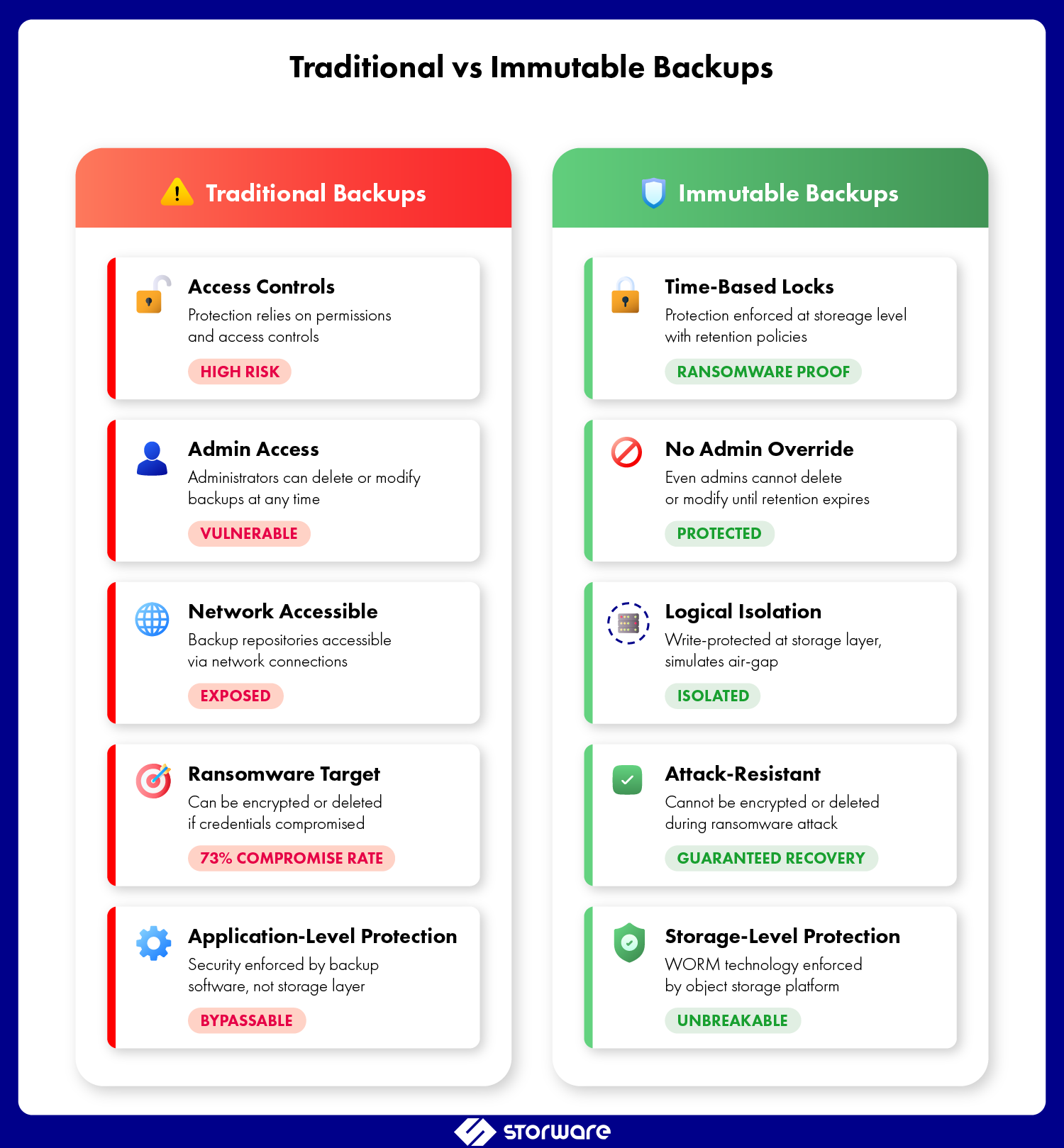
Traditional backup methods rely on access controls and permissions to protect backup data. A typical backup infrastructure might include:
- Administrative accounts with full read/write/delete permissions
- Network-accessible backup repositories
- Incremental and differential backups that can be modified
- Backup catalogs that can be corrupted or deleted
The problem? If an attacker gains administrative privileges, they gain the same access to backups as legitimate administrators. They can delete backups, encrypt them, or corrupt directory databases, effectively preventing data recovery. Statistically, 32% of ransomware attacks exploit unpatched vulnerabilities, and 52% begin with phishing emails. Research shows that 94% of organizations attacked by ransomware reported attempts to compromise their backups, making the backup infrastructure a prime target for attacks.
Immutable Backups: The Game Changer
Immutable storage solutions for enterprise data protection operate on a different principle entirely:
- Time-bound protection: Retention policies enforced at the storage level, not the application level
- Zero trust architecture: Assumes breach will occur and designs accordingly
- Cryptographic verification: Hash-based integrity checking ensures data hasn’t been tampered with
- Air-gap simulation: Logical separation that mimics physical air-gapped backups without the operational overhead
The key difference is this: with traditional backups, you’re assured that security will prevent unauthorized access. With immutable backups, you assume security will fail and use built-in security measures that persist even after a breach.
The Role of Immutable Backups in Ransomware Protection
Ransomware attacks are a highly profitable business these days. According to Veeam’s 2024 research, the average time between gaining access to a system, stealing data, and demanding a ransom has dropped to just 24 hours. Ransomware attacks conduct reconnaissance, identify the backup infrastructure, establish persistence, and then simultaneously encrypt production data, sabotaging backups (Cyber Kill Chain). Average ransom payments reached $2.73 million in 2024, an increase of almost $1 million compared to 2023. Immutable backups interrupt this chain of attacks at the most critical moment.
How Attackers Target Backup Infrastructure
Modern ransomware attacks follow a predictable pattern when targeting data backup solutions. Global ransomware attacks increased by 11% in 2024, reaching 5,414 incidents, with U.S. attacks surging by 149% year-over-year in early 2025. The typical attack progression:
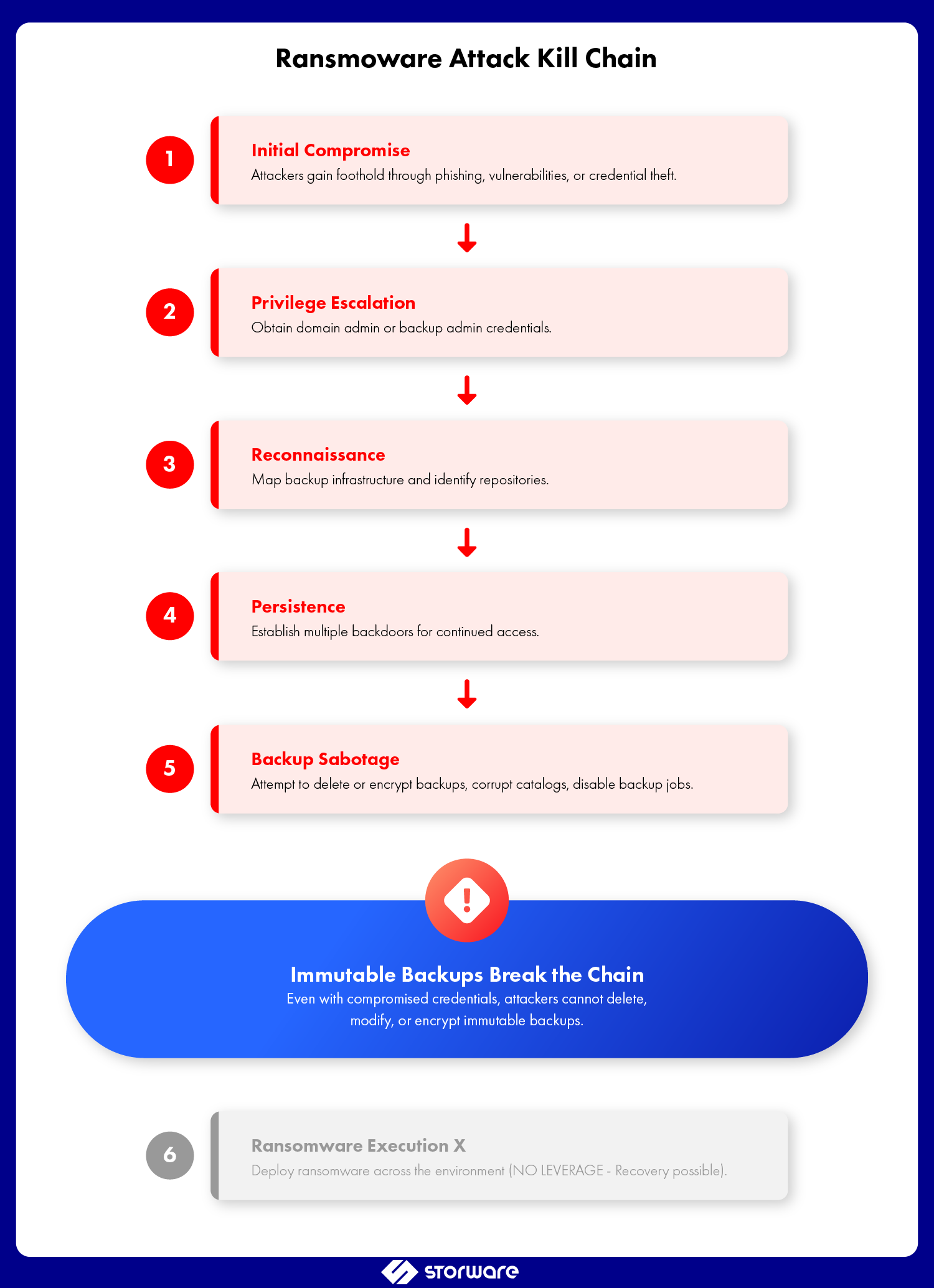
1. Initial compromise: Gain foothold through phishing, vulnerabilities, or credential theft
2. Privilege escalation: Obtain domain admin or backup admin credentials
3. Reconnaissance: Map backup infrastructure and identify repositories
4. Persistence: Establish multiple backdoors for continued access
5. Sabotage: Delete or encrypt backups, corrupt catalogs, disable backup jobs
6. Execution: Deploy ransomware across the environment
Without immutable backups, this attack chain succeeds. In fact, in the financial services sector, 9 out of 10 ransomware attacks attempted to compromise backups. With immutability, step 5 fails, and you retain the ability to recover without paying ransom.
Real-World Cyber Attack Recovery Scenarios
Consider a healthcare organization hit by ransomware. Their traditional backup approach included:
- Daily backups to a NAS device
- Weekly tape rotations stored off-site
- Backup admin account with domain admin privileges
The attackers compromised the backup admin account, deleted all disk-based backups, and encrypted the backup catalog. Research shows this is increasingly common — while 99% of organizations invest in backup technologies, 93% encounter significant issues during recovery attempts. The organization faced a choice: pay the ransom or wait weeks for tape-based recovery with no guarantee of success.
Now consider the same scenario with backup immutability implemented through a solution like Storware Backup and Recovery:
- Daily backups to immutable object storage with 30-day retention
- Incremental backups protected by object lock technology
- Separate, time-delayed replicas with extended immutability
When the attack occurred, the immutable backups remained intact. Recovery began within hours, not weeks. The attackers’ leverage evaporated. This is the power of immutable storage—even with compromised credentials, the backups cannot be altered or deleted.
Implementing Immutable Backups: The 3-2-1-1 Rule
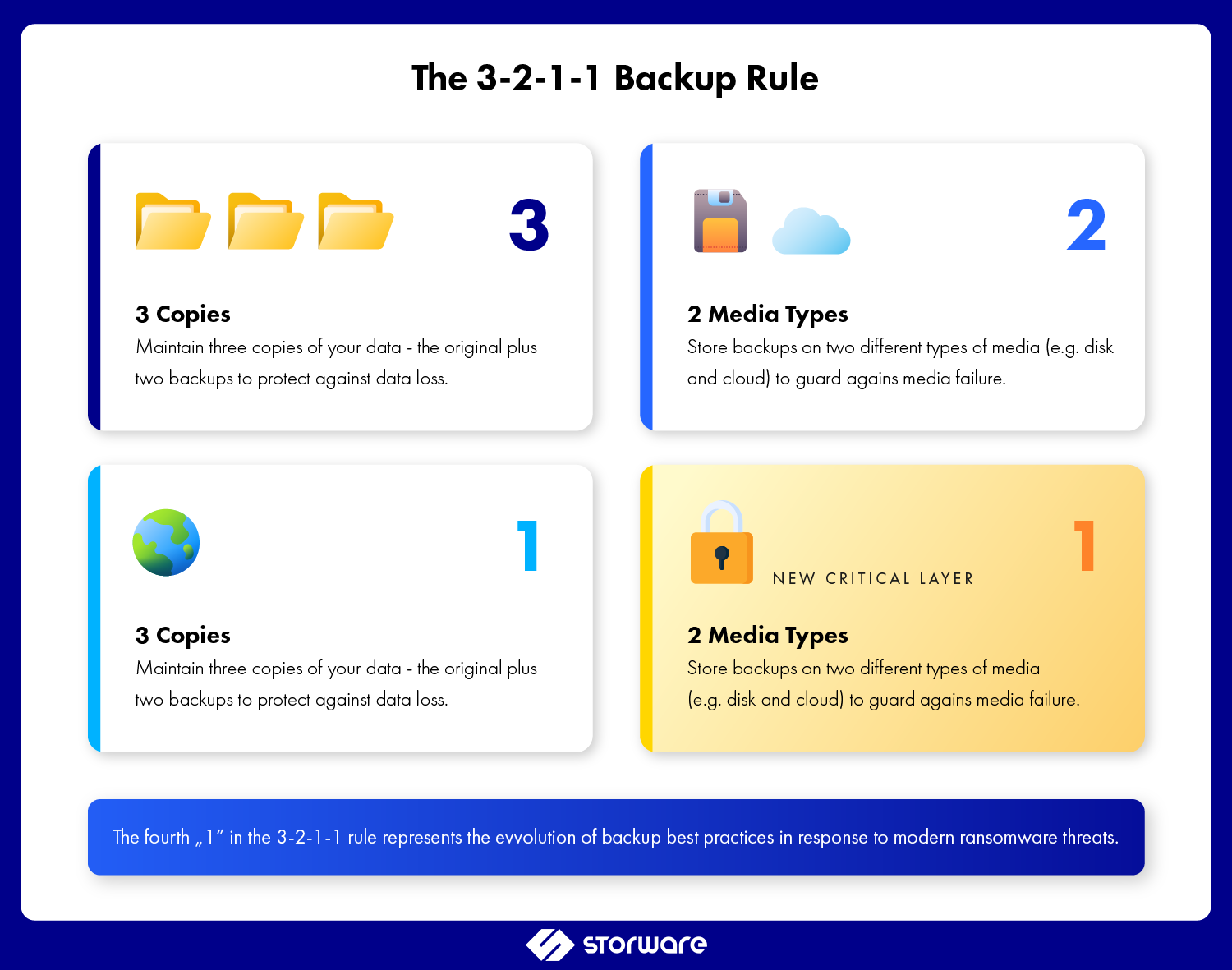
The evolution of backup best practices now incorporates immutability as a core tenet. The traditional 3-2-1 backup rule—three copies of data, on two different media types, with one copy off-site—has been enhanced to 3-2-1-1:
- 3 copies of your data
- 2 different media types
- 1 copy off-site
- 1 copy immutable
This framework ensures that even in a worst-case breach scenario, you maintain a recoverable copy of your data.
Practical Implementation Considerations
When deploying immutable storage solutions, backup admins should address several key factors. Solutions like Storware Backup and Recovery integrate immutability features directly into the backup workflow, simplifying implementation and management:
Retention Period Planning
- Balance security needs against storage costs
- Consider compliance requirements (GDPR, HIPAA, SOX)
- Account for attack dwell time
- Recommendation: Minimum 14-day immutability, ideally 30+ days
Storage Architecture
- Object storage platforms with native immutability (S3 Object Lock, Azure Immutable Blob Storage)
- Purpose-built immutable backup appliances like Storware Backup Appliance, which combines backup software with hardened, immutable storage in a single solution
- Cloud-integrated immutable repositories
- Consider write performance, capacity scaling, and retention management
Access Control Design
- Separate backup admin roles from immutability management
- Implement time-delayed administrative access (break-glass procedures)
- Use multi-factor authentication for all privileged accounts
- Regular access reviews and least-privilege enforcement
Backup Retention Policies
- Align immutability windows with RPO/RTO requirements
- Consider GFS (Grandfather-Father-Son) schemes with varying immutability periods
- Document legal hold requirements for compliance and immutable backups
- Plan for retention extension without data movement
Immutable Backups vs Air-Gapped Backups
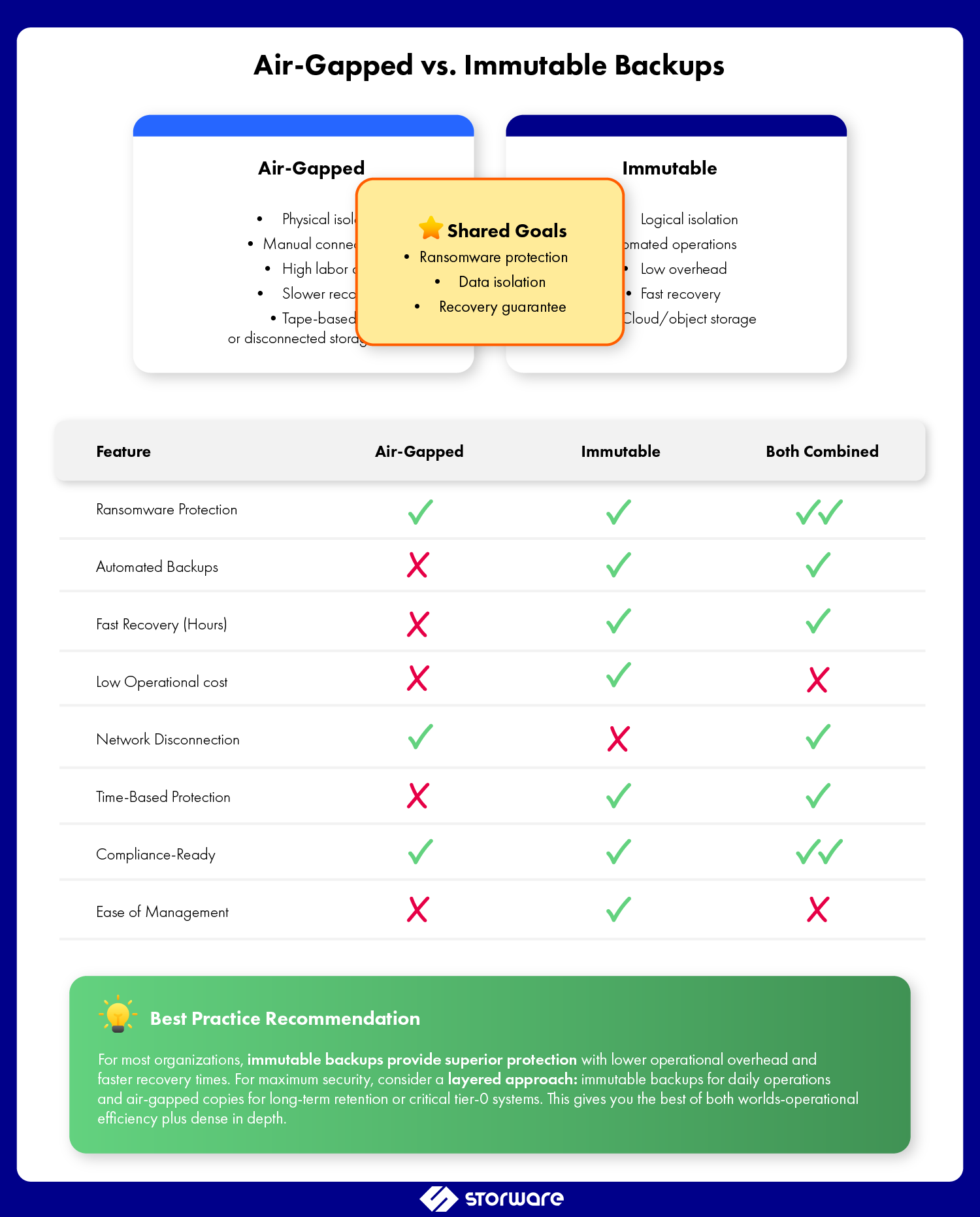
A common question among backup admins: “Aren’t air-gapped backups already immutable?” While these approaches share goals, they differ significantly in implementation and operational impact.
Air-Gapped Backups
- Physical isolation: Complete network disconnection
- Manual intervention: Human-driven connection for backup operations
- High operational overhead: Significant labor for tape handling or connection management
- Recovery time: Slower due to physical media access or reconnection procedures
- Cost: Moderate to high (media, transportation, secure storage)
Immutable Backups
- Logical isolation: Network-connected but write-protected
- Automated operations: Standard backup workflows maintained
- Low operational overhead: No manual intervention for routine operations
- Recovery time: Fast, network-speed recovery
- Cost: Generally lower with cloud object storage options
For most organizations, immutable backups offer a superior balance of security and operational efficiency. They provide ransomware recovery capabilities comparable to air-gapped systems without the operational burden.
Compliance and Immutable Backups
Backup security in enterprises is regulated by legal provisions that explicitly or implicitly refer to the need to create immutable backups:
- GDPR: Right to erasure vs. data retention requirements
- HIPAA: Safeguarding ePHI with administrative, physical, and technical safeguards
- SOX: Financial data integrity and retention requirements
- FINRA: WORM storage requirements for financial services
Immutable backups help satisfy these requirements while providing evidence of due diligence in data protection practices.
Best Practices for Backup Admins
Successfully implementing immutable backup solutions requires attention to both technical and operational details.
- Start with critical systems: Prioritize tier-0 and tier-1 applications for initial immutable backup deployment
- Test recovery regularly: Immutability is worthless if you can’t restore. Schedule quarterly recovery drills using immutable copies.
- Monitor immutability status: Implement alerting for retention policy changes, failed immutability operations, or suspicious access patterns
- Separate backup infrastructure: Use dedicated networks, credentials, and administrative boundaries for backup systems
- Layer your defenses: Immutability is one component of cyber resilience, not a complete solution. Maintain endpoint protection, network segmentation, and incident response capabilities
- Document everything: Retention policies, recovery procedures, compliance mappings, and lessons learned from testing
- Plan for scale: Consider growth projections when sizing immutable storage to avoid costly migrations
- Vendor evaluation: Assess backup solutions based on immutability features, performance impact, recovery capabilities, and total cost of ownership
Conclusion: Immutability as Foundation for Cyber Resilience
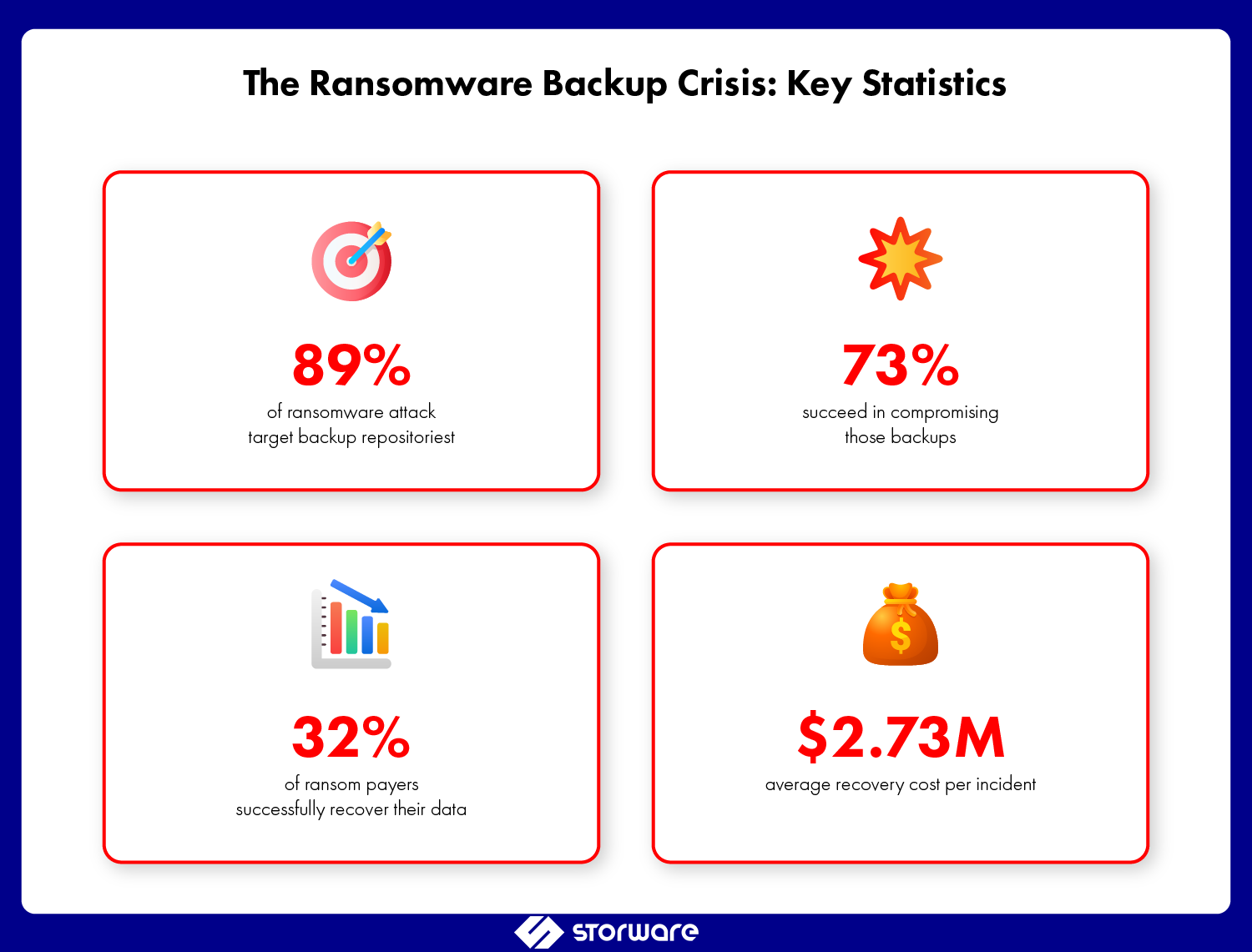
The statistics paint an undeniable picture: 89% of ransomware attacks target backup repositories, 73% successfully compromise those backups, and only 32% of ransom payments result in full data recovery. The question for backup admins is no longer whether to implement immutable backups, but how quickly you can deploy them.
Cyber resilience isn’t about preventing every attack; it’s about ensuring business continuity regardless of what succeeds in penetrating your defenses. Immutable backups provide that assurance. They transform your backup infrastructure from an attractive target into an impenetrable vault that attackers cannot breach, regardless of what credentials they compromise or what privileges they escalate to.
The technology exists, the business case is compelling, and the threat landscape demands action. For backup admins responsible for protecting enterprise data, implementing immutable backup solutions isn’t just a best practice—it’s a professional imperative.
Ready to enhance your backup security with immutable storage? Storware Backup and Recovery and the Storware Backup Appliance include integrated immutability features designed for ransomware protection and cyber resilience. Our solutions support object lock technology, flexible retention policies, and seamless integration with cloud and on-premises storage—giving you the tools to implement the 3-2-1-1 backup strategy effectively. Contact us to learn how we can help protect your organization’s most critical asset: its data.