Proxmox Backup and Recovery: The Post-VMware Production Guide
Table of contents
- Who this guide is for:
- Why Proxmox keeps showing up on the shortlist
- What Proxmox Backup Server does well
- Where PBS leaves enterprise gaps
- What enterprise-grade Proxmox backup looks like
- Proxmox backup with Storware — what it looks like in practice
- A note on the migration step
- Frequently asked questions
- Next step
- Related reading:
What to plan for when Proxmox VE becomes your new production virtualization platform — and where Proxmox Backup Server leaves enterprise gaps.
Proxmox VE was the open-source darling of homelab Reddit threads for a decade. In 2026 it’s the platform a remarkable number of mid-market organisations are landing on after leaving VMware. The reasons are practical: no per-core licence, a vSphere-like operational model, mature WebUI, real HA clustering, live migration that works, and a learning curve measured in months rather than years.
The trouble is that most Proxmox migration content stops at the migration. It tells you how to move your VMs across — Proxmox’s built-in importer handles that competently — and then leaves the harder question untouched: how do you protect a serious Proxmox estate once the workloads are running?
This guide answers that question. It’s written for teams who have either completed a Proxmox migration or are about to, and who need to make a real decision about backup architecture. We’ll cover what Proxmox Backup Server (PBS) does well, where it leaves gaps that matter at enterprise scale, and what a production-grade Proxmox protection strategy actually looks like.
Who this guide is for:
- Infrastructure architects evaluating Proxmox as a VMware replacement target
- Operations teams who have already migrated to Proxmox and are now scoping enterprise backup
- MSPs delivering Proxmox-based services to multiple tenants
- Anyone responsible for ransomware resilience, regulatory compliance, or DR planning on Proxmox
Why Proxmox keeps showing up on the shortlist
Three structural reasons, in plain terms:
First, the licensing model is genuinely different. Proxmox VE itself is open source under AGPLv3. Optional enterprise subscriptions exist (community, basic, standard, premium tiers) but they buy support and access to the enterprise repository — they’re not gating the software. There’s no core-count minimum, no per-VM uplift, no bundle you’re forced into. For organisations whose vSphere Essentials Plus was discontinued by Broadcom and replaced with VCF pricing, the math is stark.
Second, the operational model is close enough to vSphere that VMware administrators can be productive in months. Datacenter view, clusters, nodes, VMs, snapshots, templates, live migration — the mental model maps directly. The differences are real (storage configuration, network bridges, qemu-agent for guest integration) but they’re learnable, not paradigm shifts.
Third, Proxmox does the foundational things competently. HA clustering with Corosync, live migration with online storage migration, ZFS as a first-class storage option, CephFS integration, software-defined networking via SDN, RBAC, two-factor authentication. The platform is mature in the ways that matter for production workloads.
The gaps tend to be in the surrounding tooling — and backup is the most consequential.
Most Proxmox migration content stops at the migration. The harder question — how do you protect a serious Proxmox estate once the workloads are running? — is where teams get into trouble.
What Proxmox Backup Server does well
Proxmox Backup Server is the open-source companion product to Proxmox VE. It’s a separate appliance — purpose-built for backup workloads — that ingests data from one or more Proxmox VE clusters. For teams whose Proxmox estate is small to medium and whose protection requirements are modest, PBS is a respectable choice.
What it does well:
- Incremental forever backups with deduplication. PBS uses a content-addressable storage model — identical data chunks are stored once across all backups. Storage efficiency is good.
- Built-in scheduling and retention policies. Schedule jobs per VM or per group; configurable retention by recency tier.
- Live restore. Restore a VM directly into production with the disk being streamed in the background — useful for ransomware recovery scenarios.
- Verification and pruning. Backups can be verified against checksums on a scheduled basis; pruning removes data outside retention windows.
- Open-source. AGPLv3, free to use, optional enterprise subscriptions for support.
For a homelab, a small business, or a development environment, PBS is fine. The honest assessment is that it covers the basics well and doesn’t pretend to be more than it is.
Where PBS leaves enterprise gaps
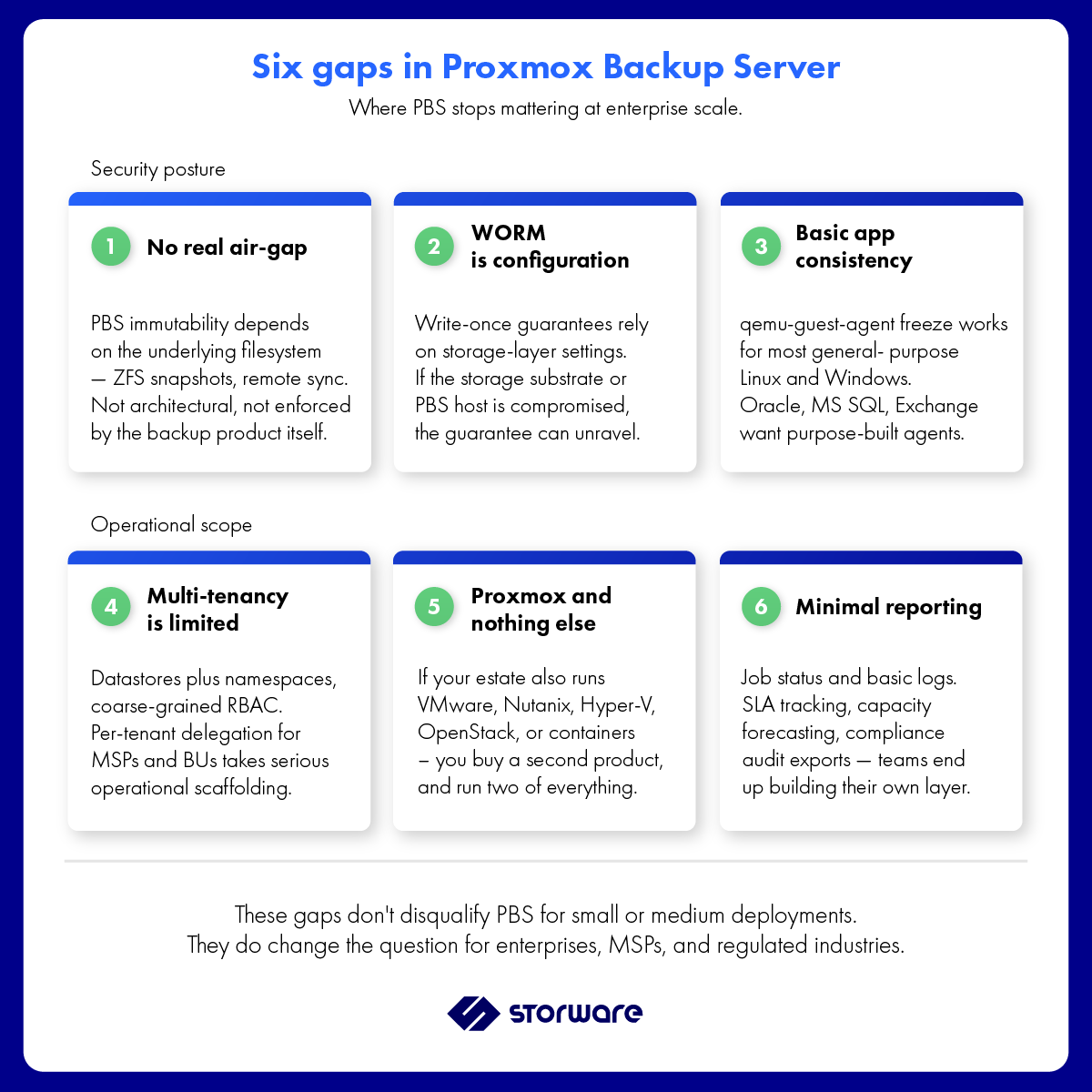
PBS was designed for the Proxmox community. It wasn’t designed for enterprises with ransomware concerns, compliance audits, multi-tenant service provider models, or heterogeneous estates that include other platforms alongside Proxmox. Six gaps tend to matter at enterprise scale:
Gap 1: No real air-gap
PBS supports immutability via the underlying filesystem (ZFS snapshots, for example) and can be configured to write to remote storage. What it doesn’t provide is a true air-gap — a backup tier physically or logically isolated from the production network and impossible to reach from a compromised production host. For ransomware resilience under NIS2 or DORA, this is increasingly not optional.
Gap 2: WORM immutability is configuration, not architecture
Write-once-read-many guarantees in PBS depend on the storage layer beneath it. If an attacker compromises the storage substrate or the PBS host itself, the immutability guarantee can be undermined. Architectural WORM — enforced by the backup product, not the storage — is a different posture.
Gap 3: Multi-tenancy is limited
PBS has datastores and namespaces, but it doesn’t have the kind of tenant isolation that MSPs and large enterprises with internal business units need. RBAC is present but coarse-grained. Operational delegation per tenant — let a customer or a BU manage their own retention and restores without touching others — requires significant operational scaffolding.
Gap 4: Heterogeneous coverage doesn’t exist
PBS protects Proxmox. That’s it. If your estate also includes VMware (during the migration window or permanently), Nutanix AHV, OpenShift Virtualization, Hyper-V, KVM, or anything else, you need a second backup product. Most enterprises end up running two or three protection tools, each with its own console, policies, RBAC, and audit trail. The operational cost compounds.
Gap 5: Application-consistent backups are basic
PBS uses qemu-guest-agent for filesystem freeze coordination, which works for most general-purpose workloads. For transactional databases (Oracle, MS SQL, PostgreSQL with WAL coordination) and application-specific consistency (Exchange, Active Directory), purpose-built application agents typically outperform the generic approach.
Gap 6: Reporting and audit are minimal
PBS surfaces job status and basic logs. Enterprise reporting — SLA tracking, capacity forecasting, audit exports for compliance reviews, multi-cluster dashboards — is not a strong suit. Teams often end up exporting data and building their own reporting layer.
None of these gaps disqualify PBS for small or medium deployments. They do raise the question of whether PBS is the right architectural choice for a Proxmox estate that’s part of an enterprise’s regulated, multi-tenant, or heterogeneous infrastructure.
What enterprise-grade Proxmox backup looks like
The shortlist of credible enterprise backup options for Proxmox in 2026 is small. Veeam supports Proxmox (added relatively recently). A handful of generalist vendors have varying degrees of integration. Storware Backup and Recovery is in that shortlist and addresses each of the six gaps above directly.
Concretely, here’s what changes when you put an enterprise data protection platform alongside Proxmox VE:
| Capability | Proxmox Backup Server | Storware Backup and Recovery |
|---|---|---|
| Architecture | Agentless via Proxmox API | Agentless via Proxmox API |
| Air-gap | Filesystem-dependent (e.g. ZFS snapshots) | IsoLayer — architectural air-gap built into the product |
| WORM immutability | Storage-layer (configuration-dependent) | Product-enforced WORM, independent of storage |
| Encryption | Supported; client-side | AES, integrated key management |
| Multi-tenancy | Datastores + namespaces; coarse RBAC | Full multi-tenancy with per-tenant delegation, MSP-grade |
| MFA | Supported | Supported via Keycloak |
| Application-consistent backups | qemu-guest-agent freeze | qemu-guest-agent freeze + OS Agent for transactional workloads |
| Other platforms protected by the same product | Proxmox only | VMware, Nutanix AHV, OpenShift Virtualization, Hyper-V, OpenStack, Canonical, Virtuozzo Infrastructure, VergeOS, XCP-ng, Citrix Hypervisor, Scale Computing, and others under one licence |
| Backup destinations | Local PBS datastore; remote sync to another PBS | Local filesystems, object storage (S3-compatible), Storware Cloud, tape, external providers |
| Recovery Plans / orchestrated DR | Not built in | Recovery Plans built in |
| Licensing model | AGPLv3; optional support subscriptions | Universal licence covering all supported sources and targets |
The architectural argument is straightforward: if Proxmox is going to be in your stack alongside other platforms — even temporarily during the VMware migration window, or permanently if your estate is heterogeneous — running one protection platform across everything is operationally simpler than running two.
Proxmox backup with Storware — what it looks like in practice
The mechanics, kept short:
- Connect Proxmox VE as a Virtualization Provider in the Storware Backup and Recovery WebUI. Authentication uses Proxmox API tokens with appropriate role scope. No agent is installed inside guests for VM-level backups.
- Define backup policies by tag, by cluster, by VM group, or by individual VM. Schedule, retention tier, encryption, deduplication, and destination are all policy-level decisions.
- Choose a backup destination — local filesystem, object storage (any S3-compatible target including hyperscalers), Storware Cloud, or tape. IsoLayer air-gap and WORM can be applied at the destination level.
- Add MFA via Keycloak and configure RBAC for the operations team and any delegated tenants. Multi-tenant deployments inherit Storware’s MSP-grade isolation model.
- Enable Recovery Plans for orchestrated DR scenarios — ordered recovery of dependent VMs, network reconfiguration, validation hooks.
- Validate with Instant Restore for spot-checks; the VM is recoverable to a target Proxmox cluster in moments, with Live Storage Migration handling the disk move to the production datastore in the background.
For organisations that arrived on Proxmox from VMware via Storware-protected backups, the operational model on Proxmox is intentionally identical to the model used on VMware. Same WebUI, same policies, same RBAC. The platform changed; the protection layer didn’t.
A note on the migration step
This article is about protection, but the migration step deserves a clarification because it’s a question that comes up. Storware does not currently provide a V2V migration path directly from VMware to Proxmox. The Proxmox VE platform includes a built-in VMware importer that handles ESXi-to-Proxmox migrations natively — it’s the right tool for that job. Storware’s role in the Proxmox conversation begins after the migration: the steady-state protection layer that runs for as long as the Proxmox estate exists.
For organisations that want a Storware-led V2V migration, the supported path is VMware to OpenStack. That’s covered in the pillar guide:
VMware Migration: The 2026 Playbook for Heterogeneous Environments — at storware.eu/blog/vmware-migration/
Frequently asked questions
Is Proxmox VE ready for production enterprise workloads in 2026?
Yes, with the caveat that ‘production-ready’ depends on what surrounds the platform. Proxmox VE itself is mature for general-purpose virtualization. Where teams typically need to augment is in backup, monitoring, and configuration management — enterprise tooling that wraps the platform. For organisations that pair Proxmox with a serious backup product and serious observability, the platform supports production workloads at meaningful scale.
How does Storware Backup and Recovery compare to Proxmox Backup Server?
PBS is a free, open-source backup product designed for the Proxmox community. It covers the basics well — incremental backups, deduplication, scheduling, live restore — but it doesn’t address enterprise concerns like architectural air-gap, product-enforced WORM, multi-tenancy, application-specific consistency for transactional databases, or coverage of platforms other than Proxmox. Storware addresses each of those gaps and protects 15+ platforms under one licence. The right answer depends on the scope of what you need to protect.
Can Storware protect Proxmox and VMware simultaneously during a migration window?
Yes — and this is the typical use case for organisations mid-migration. The same Storware deployment protects the VMware source environment, the in-flight migration cohort, and the Proxmox target environment under one universal licence. There is no protection gap during the project window.
Does Storware require agents to back up Proxmox VMs?
No, for VM-level backups. Storware uses the Proxmox API agentlessly. Agent-based components apply only where Storware needs application-consistent quiescing for specific workloads (the OS Agent handles transactional database integration) or for file-level backups from inside guest OSes.
What about ransomware resilience?
Storware’s IsoLayer provides an architectural air-gap independent of the underlying storage. Combined with product-enforced WORM immutability, AES encryption, MFA via Keycloak, and RBAC, the platform supports the ransomware-resilience posture required under NIS2 and DORA. PBS can achieve some of these properties through careful storage configuration; Storware delivers them as architectural defaults.
Is Storware GDPR-compliant and outside the CLOUD Act perimeter?
Yes. Storware is headquartered in Warsaw, Poland, with EU-based engineering, support, and control-plane operations. The platform is GDPR-aligned by design and used by EU public-sector and regulated-industry customers under NIS2 and DORA constraints. Storware is outside the US extraterritorial jurisdiction created by the CLOUD Act.
Next step
Storware solution architects run scoped Proxmox backup assessments — covering current Proxmox estate size, mixed-platform requirements, sovereignty constraints, and existing protection gaps. The output is a written assessment, not a sales pitch.
Book a Proxmox backup assessment: storware.eu/book-meeting/
For the full architectural playbook on leaving VMware, including the four pre-migration questions and the six target platforms compared side by side, see the pillar guide: VMware Migration: The 2026 Playbook for Heterogeneous Environments at https://storware.eu/blog/vmware-migration/
Related reading:
