
Table of Contents
During a serious incident, nobody wants to read a forty-page disaster recovery policy. The team needs to know who makes the decisions, what to recover first, where to restore it, and how to confirm that recovery worked.
A disaster recovery (DR) runbook answers those questions in advance. It gives the team a defined sequence of actions, named owners, and clear completion criteria, so people can focus on execution rather than debating the next step.
This chapter provides a practical template you can adapt to your OpenStack environment. It follows the broad contingency-planning lifecycle described in NIST SP 800-34: preparation, activation, recovery, and reconstitution. The procedure is adapted to the distinct layers of an OpenStack cloud, including its control plane, storage, tenant workloads, and external dependencies.
The short answer: an OpenStack DR runbook needs five elements:
- People, responsibilities, and contact details that remain accessible during an outage.
- Clear criteria for declaring a disaster and selecting the recovery path.
- A workload inventory with recovery priority, RTO, RPO, dependencies, and recovery method.
- A phase-by-phase procedure for restoring the control plane, storage, and workloads.
- Validation, traffic cutover, failback, and post-incident review steps.
Keep the runbook actionable, store a copy outside the cloud it describes, and update it after tests and significant infrastructure changes.
Choosing the recovery path
The first decision during an OpenStack incident is whether to restore damaged workloads in the existing cloud, recover the control plane, or move workloads to another environment.
Put this decision flow near the beginning of your runbook.
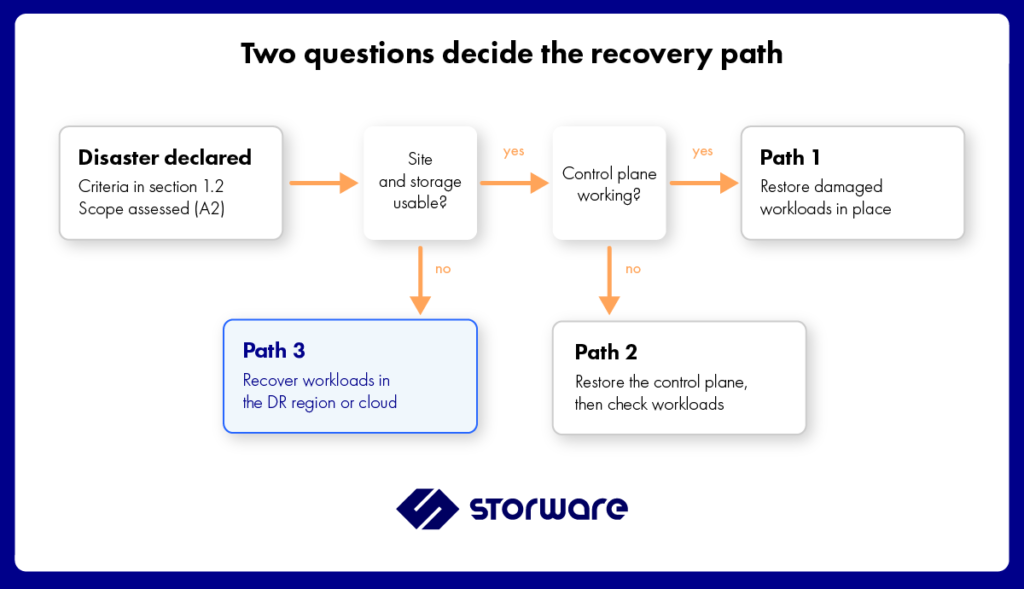
Path 1: Restore in place
The site, storage, and control plane remain usable, but selected workloads are damaged, deleted, or encrypted.
Restore the affected workloads from suitable backup copies into the existing cloud. If an attack is suspected, do not restore blindly into a potentially compromised environment.
Path 2: Recover the control plane
The site and underlying storage remain usable, but the control plane is lost or corrupted.
Follow the recovery procedure for the deployed OpenStack distribution to restore the service databases, keys, configuration, and services. Then validate the state of the workloads and restore any data or instances that are damaged.
See [OpenStack Control Plane Backup and Recovery].
Path 3: Recover elsewhere
The primary site, storage, or entire cloud is unusable, or the primary control plane cannot be trusted after a security incident.
Recover workloads in the prepared DR region or independent OpenStack cloud. Verify the target environment, access to backup copies, and all required mappings before starting recovery.
See [Cross-Region Recovery for OpenStack].
If an attack is suspected, involve the security lead in choosing the recovery path and recovery point. A primary cloud that still responds to API requests may nevertheless be unsafe to use.
OpenStack DR runbook template
Copy the following sections into your own operational document and replace every item in square brackets. Adapt the roles and steps to your deployment, storage architecture, and business requirements.
Part 1: People and disaster declaration
1.1 Roles and contacts
Assign a primary owner and deputy for every critical responsibility. Include contact details that remain accessible when corporate email, chat, identity services, or the OpenStack environment are unavailable.
| Role | Responsibility | Primary | Deputy | Out-of-band contact |
|---|---|---|---|---|
| Incident lead | Declares the disaster, sets priorities, and coordinates decisions | [Name] | [Name] | [Phone / personal email] |
| Cloud platform lead | Recovers the control plane and OpenStack services | [Name] | [Name] | [Phone] |
| Storage lead | Manages Ceph or storage arrays, replication, and storage failover | [Name] | [Name] | [Phone] |
| Backup and recovery lead | Locates backup copies, coordinates restores, and tracks recovery order | [Name] | [Name] | [Phone] |
| Network lead | Manages Neutron, routing, DNS, load balancers, and firewalls | [Name] | [Name] | [Phone] |
| Application owners | Validate each recovered service and its data | [Per workload] | [Per workload] | [Phone] |
| Communications lead | Coordinates updates to management, customers, and regulators where required | [Name] | [Name] | [Phone] |
| Security lead | Coordinates investigation, containment, and the assessment of whether recovered systems are safe | [Name] | [Name] | [Phone] |
Store this table in version control and keep an offline or printed copy at each relevant site. If chat, email, or the company wiki depends on the failed platform, those tools may be unavailable when the team needs them most.
1.2 Declaring a disaster
Define in advance when the team moves from troubleshooting to disaster recovery.
- Declaration criteria: [For example: a critical service is unavailable beyond its permitted recovery window; the control plane cannot be recovered within the agreed threshold; or the security lead confirms compromise of administrative credentials.]
- Who can declare: [Incident lead or designated deputy.]
- Initial actions: Notify the assigned responders, open an incident log, assess the scope, and confirm the availability of usable recovery points.
- Security escalation: [Conditions requiring the security lead to approve the recovery approach or recovery point.]
- Regulatory reporting: [Applicable reporting obligations, responsible person, and internal escalation deadlines.]
- Decision record: [Where the declaration, timestamps, chosen path, and rationale are recorded.]
Do not use a generic threshold without considering the workload RTOs and the likely impact of waiting. The runbook should identify who makes the decision and what evidence they need.
For regulated environments, verify the current reporting requirements applicable to your organization. DORA and NIS2 have different scopes and obligations; do not assume one reporting deadline applies to every incident or organization.
Part 2: Workload inventory
The workload inventory turns “restore everything” into an ordered list of recovery tasks. Complete one row for each workload or application group.
2.1 Workloads by tier
| Workload / application | Owner | Tier | RTO | RPO | Recovery method | Dependencies | Restore order | Last tested / measured RTO |
|---|---|---|---|---|---|---|---|---|
| Example: Customer portal — 3 instances, 2 volumes | [Name] | 1 | [4 h] | [15 min] | [Replication failover; backup as fallback] | [Database cluster, DNS, network] | 2 | [Date and measured duration] |
| [Workload name] | [Name] | [1 / 2 / 3] | [Target] | [Target] | [Recovery plan / instant restore / standard restore / other] | [Dependencies] | [Order] | [Date and measured duration] |
| [Workload name] | [Name] | [1 / 2 / 3] | [Target] | [Target] | [Recovery method] | [Dependencies] | [Order] | [Date and measured duration] |
The customer portal row is illustrative only. Its RTO and RPO are examples of how to document requirements, not product performance guarantees or recommended values for every application.
Use the workload tiers defined in [Replication vs Backup in OpenStack: Choosing a DR Strategy]. Record actual recovery times from tests rather than relying on estimates.
- RTO (Recovery Time Objective): the maximum acceptable time to restore the service.
- RPO (Recovery Point Objective): the maximum acceptable amount of data loss, expressed as time.
Prioritize workloads according to their business requirements and dependencies. For example, a database may need to be available before an application server can pass validation. DNS, identity services, storage, and networking may also need to be recovered before users can reach the application.
2.2 Recovery prerequisites
A checklist confirmed during preparation, and again at step 3 of the procedure.
- Off-site backup copies are reachable from the DR site, and at least one copy is immutable or offline
- Control plane backups (database, keys, configuration) are stored outside the cloud (Chapter 1)
- Target projects, flavors, images, networks, security groups and quotas exist (Chapter 3)
- Recovery plans exist for each Tier 1 and Tier 2 group
- DNS TTLs for critical services are short enough for cutover
- Break-glass credentials for the backup platform and the DR cloud are stored offline
Runbook template, part 3: recovery procedure
Write each step as an action with an owner and a check. Record the time at the start and end of every phase; those timestamps become the measured RTO in your report.
Phase A: activation and assessment
| # | Action | Owner | Done when |
| A1 | Declare the disaster using the criteria in 1.2 and start the incident log | Incident lead | Declaration time recorded |
| A2 | Assess the scope: control plane, storage, workloads, site | Platform and storage leads | Path chosen from the decision flow |
| A3 | If an attack is suspected, isolate affected systems and pick a recovery point from before the compromise | Security lead, backup lead | Recovery point agreed in writing |
Phase B: recover the platform
| # | Action | Owner | Done when |
| B1 | Path 2: restore the control plane in order (database, keys and configuration, services). Path 1: skip to Phase C | Platform lead | Token issued, projects and instances listed |
| B2 | Path 3: confirm the DR cloud and its prerequisites (2.2) | Platform lead | Checklist complete |
| B3 | Storage failover where replication is in place | Storage lead | Replicated volumes available |
Phase C: recover workloads
| # | Action | Owner | Done when |
| C1 | Run recovery plans in restore order from 2.1, Tier 1 first | Backup lead | Plans completed without errors |
| C2 | Restore remaining workloads individually, by tier | Backup lead | All in-scope workloads restored |
| C3 | Application owners validate each service and data freshness | Application owners | Sign-off per workload |
Phase D: cutover and communication
| # | Action | Owner | Done when |
| D1 | Switch DNS, load balancers and certificates to recovered services | Network lead | Services reachable by users |
| D2 | Inform management, customers and, where required, regulators | Communications | Messages sent and logged |
Phase E: reconstitution and review
| # | Action | Owner | Done when |
| E1 | Plan failback once the primary is repaired, including data written during the incident | Incident lead | Failback date and method agreed |
| E2 | Hold a post-incident review: measured RTO and RPO per workload, what went wrong, what to change | Incident lead | Actions assigned with owners |
| E3 | Update this runbook and the inventory | Backup lead | New version stored outside the cloud |
Keeping the runbook alive
A runbook goes stale faster than the infrastructure it describes. Four habits keep it usable:
- Version it in a repository, with a printed or offline copy at each site.
- Update it after every test and every major change: new workloads, an OpenStack upgrade, a new storage backend, a change of people.
- Rehearse it. A tabletop walkthrough twice a year and a full recovery exercise at least yearly. See Disaster Recovery Testing.
- Measure it. Compare the timestamps in each exercise with the RTO in the inventory, and fix the largest gap first.
Where Storware fits in the runbook
Storware Backup and Recovery covers the workload steps of the runbook, and runs outside the cloud it protects.
- Recovery plans turn step C1 into one operation per workload group: which instances, from which backup, with which settings and to which target platform. The same plan runs on a schedule as a recurring test.
- Restore into another OpenStack supports path 3, with a target flavor and key pair, and image upload if the target lacks it.
- Immutable and air-gapped destinations give step A3 a recovery point an attacker could not change.
See Storware for OpenStack and Disaster Recovery.
Frequently asked questions
What is a disaster recovery runbook?
A disaster recovery runbook is an operational, step-by-step procedure for restoring systems after a serious incident. It identifies the people involved, the criteria for declaring a disaster, the recovery sequence, and the checks that confirm each step has worked.
What is the difference between a DR plan and a DR runbook?
A DR plan establishes objectives, scope, responsibilities, and the overall approach to recovery. A runbook translates that plan into specific actions, assigned owners, and completion checks that the team follows during an incident.
What should an OpenStack DR runbook include?
It should include roles and out-of-band contacts, declaration criteria, a workload inventory with tiers, RTO, RPO and recovery methods, recovery prerequisites, procedures for the control plane and workloads, validation, traffic cutover, failback, and post-incident review.
Where should the runbook be stored?
Keep a version-controlled copy and an offline or printed copy at each relevant site. A runbook stored only in the OpenStack cloud it describes may be unavailable during a site outage or control plane failure.
How often should an OpenStack DR runbook be updated?
Update it after every recovery test and every significant change to the cloud, workloads, storage, networking, or key personnel. Review it regularly, at least twice a year as a baseline, and sooner when risk, architecture, or regulatory requirements call for it.
Does the runbook need to cover the OpenStack control plane?
Yes. If the control plane is lost, workloads may be impossible to manage even when their underlying data survives. The runbook should cover recovery of the control plane using the deployed distribution’s supported procedure, or the switch to a prepared recovery cloud when the primary environment cannot be trusted or restored.
How does Storware help with an OpenStack DR runbook?
Storware Backup and Recovery supports workload backup and recovery for supported OpenStack configurations. Recovery plans can help organize and execute supported restore operations. Their suitability for a particular target cloud and recovery scenario should be verified and tested in advance.
Previous chapter: Cross-Region Recovery for OpenStack · Back to the guide: OpenStack Disaster Recovery: The Complete Guide
CTA block: Turn step C1 into one operation. Start a 60-day trial and build your first recovery plan, or talk to our engineers.
Storware Backup and Recovery. #1 Backup & DR for OpenStack. Simplified. Scalable. Proven.