
Table of Contents
Replication and backup are often discussed as alternatives. In OpenStack, they solve different problems.
Replication answers: How quickly can we recover service after losing a storage system or site?
Backup answers: Can we recover data from a point before it was deleted, corrupted, or compromised?
A disaster recovery strategy that relies on only one of them may leave a critical gap.
The short answer: Cinder volume replication and Ceph RBD mirroring can help reduce recovery time after certain storage or site failures. Their behavior depends on the storage driver, replication mode, and recovery procedure. Replication alone does not provide historical recovery points when unwanted changes are propagated to the secondary system. Backups preserve selected recovery points on separate storage, allowing recovery from logical failures when a suitable clean copy is available.
For most OpenStack workloads, start with a tested backup strategy. Add replication where the workload’s recovery time objective (RTO) cannot be met by restoring from backup alone.
Three mechanisms, three different jobs
Cinder volume replication
OpenStack Cinder can expose replication capabilities provided by supported storage systems. Depending on the driver and configuration, replication can be enabled for selected volumes through volume types.
In a supported backend-failover configuration, an administrator can initiate a failover procedure that switches the Cinder volume service to a secondary backend. The exact steps and the resources affected depend on the storage driver and the deployed Cinder configuration. (Cinder replication). What to know:
- Replication support and behavior vary by storage driver.
- A backend-level failover can affect more than one tenant or volume.
- Volumes that are not available on the secondary backend may require additional recovery actions.
- Failback support and procedures depend on the driver.
- Replication does not replace independent backup copies with historical recovery points.
Cinder replication is useful when the storage platform supports the required failover behavior and the workload needs faster recovery than a conventional restore can provide. Validate the complete procedure with your storage vendor and OpenStack distribution before relying on it in production.
Ceph RBD mirroring
Ceph RBD mirroring replicates block-device images between Ceph clusters. It can use journal-based or snapshot-based replication, depending on the configuration.
Journal-based mirroring propagates image changes through a journal. Snapshot-based mirroring transfers changes between mirror snapshots. The replication interval, recovery point, and operational requirements depend on the selected mode and configuration.
Failover requires coordinating the state of the source and destination images, including demoting the former primary where possible and promoting the intended secondary. The process must account for the state of the original site to avoid conflicting writes.
What to know:
- RBD mirroring replicates storage images; it does not, by itself, recreate a complete OpenStack environment.
- Instances, ports, volume attachments, and other required resources must exist or be recreated at the recovery site.
- A secondary Ceph cluster does not automatically provide a ready-to-use secondary OpenStack cloud.
- Replicated deletions or corruption may also reach the secondary, depending on the replication mode and timing.
- A tested recovery procedure is required to coordinate storage failover with the compute, networking, and control plane layers.
For this reason, Ceph RBD mirroring is often considered as part of a multi-site design with a prepared recovery environment. Independent backups remain important for recovering from logical failures.
Backups
Backups preserve data from a particular point in time on a separate storage system. With an appropriate retention policy, they provide multiple recovery points rather than only a near-current copy.
OpenStack’s Cinder backup service can protect individual volumes and supports full and incremental backups with configured backup drivers and destinations. It is a volume-level mechanism, not a complete instance-level disaster recovery solution. Restoring a volume and rebuilding the instance around it are separate tasks.
Backing up an in-use volume requires careful consideration of consistency. Depending on the method used, a backup may be crash-consistent rather than application-consistent. Application requirements may call for additional quiescing or application-level protection.
Cinder volume backups also depend on the availability of the relevant Cinder metadata and database information. The recovery plan must address those dependencies, particularly when the original control plane is unavailable.
Dedicated backup platforms can protect whole instances, their associated volumes, and supported metadata needed to reconstruct workloads. They can also store backup copies outside the production cloud and, when appropriately configured, use immutability or other isolation mechanisms.
The key difference: replication helps maintain availability after certain infrastructure failures; backups provide historical recovery points for returning to a known-good state.
Which failures does each mechanism survive?
The right choice depends on the failures your environment must tolerate. The table below is a high-level guide. Actual outcomes depend on the storage architecture, replication configuration, backup location, and recovery procedure.
| Failure scenario | Cinder volume replication | Ceph RBD mirroring | Cinder backup | Instance-level backup outside the cloud |
| Individual disk or node failure | Often handled by the storage platform’s own redundancy; replication may not be required | Often handled by Ceph’s configured redundancy; mirroring may not be required | Usually not the fastest recovery mechanism for this event | Usually not the fastest recovery mechanism for this event |
| Loss of primary storage or site | Can support recovery through backend failover, if configured and tested | Can support recovery through image promotion and a coordinated failover procedure | Can restore protected volumes if backup copies and required dependencies remain available | Can restore workloads into a prepared recovery environment, subject to target dependencies |
| Accidental volume deletion | Does not provide historical recovery by itself if the deletion propagates | Does not provide historical recovery by itself if the deletion propagates | Can restore a retained backup of the volume | Can restore a retained recovery point of the protected workload |
| Data corruption or a bad application change | May propagate the affected changes | May propagate the affected changes | Can restore a clean retained volume backup | Can restore a clean retained workload recovery point |
| Ransomware or compromised administrator account | Does not protect against unwanted changes that propagate to the secondary | Does not protect against unwanted changes that propagate to the secondary | Protection depends on the availability and isolation of clean backup copies | Protection depends on retained clean copies and the security of the backup infrastructure |
| Loss of the OpenStack control plane | Does not, by itself, restore the control plane or all required OpenStack resources | Does not, by itself, recreate a complete OpenStack environment | Recovery depends on access to the required Cinder metadata, database, and services | Can support workload recovery in another prepared OpenStack environment, subject to the supported restore workflow and target dependencies |
| Typical recovery path | Storage failover followed by workload and service validation | Image promotion coordinated with recovery of the OpenStack environment | Restore the required volume and reconnect or rebuild dependent resources | Restore workload data and supported metadata, then validate dependencies |
Read the table by rows. If your recovery requirements include a failure that replication alone cannot address, independent backup copies are still necessary.
No single mechanism guarantees recovery from every failure. The architecture, the failure scenario, and the tested recovery procedure determine what can actually be restored.
Choosing by workload tier
A practical disaster recovery strategy starts with workload requirements, not with a particular storage feature.
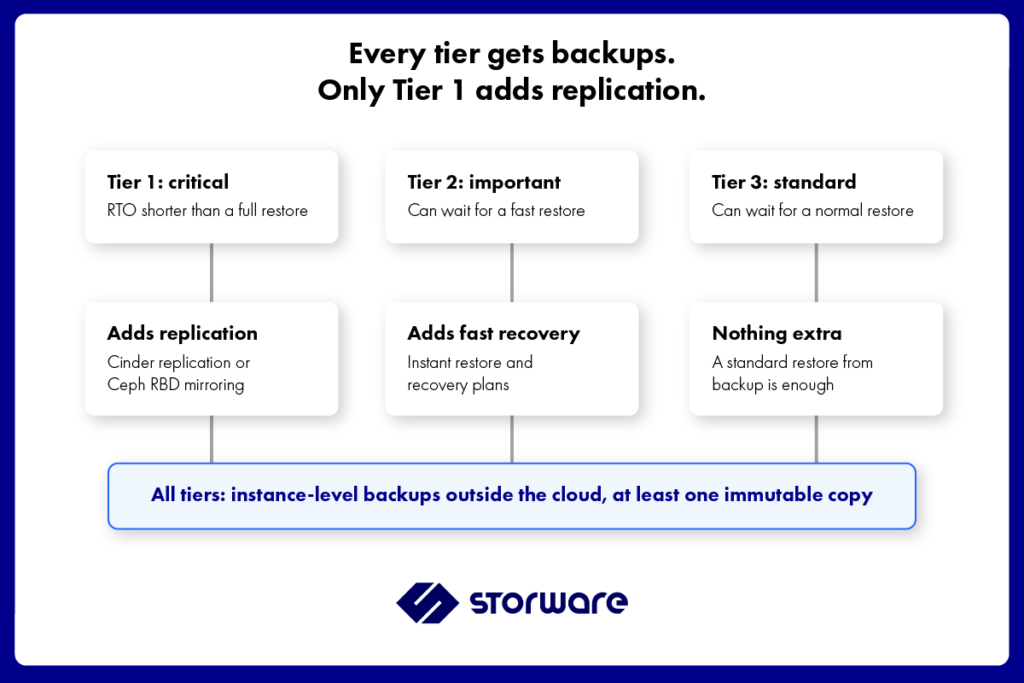
Work with application owners to establish two targets:
- RTO (Recovery Time Objective): how long the workload can remain unavailable.
- RPO (Recovery Point Objective): how much recent data the business can afford to lose.
Then group workloads into tiers based on their business criticality and the recovery targets they must meet.
Tier 1: Critical workloads
These workloads have the strictest recovery requirements. If the time needed to restore from backup exceeds the agreed RTO, consider replicating selected volumes or pools to a secondary site.
Keep independent backups as well. Replication can help with a storage or site failure, while backups provide historical recovery points when data is deleted or corrupted.
Before deploying this design, test the complete failover path, including the recovery environment, compute capacity, networking, storage promotion, and application validation.
Tier 2: Important workloads
These workloads can tolerate some downtime but still require a controlled recovery process.
A combination of instance-level backups and tested recovery features may meet their RTO without the cost and operational complexity of a second replicated storage environment.
Instant restore or recovery plans may reduce some recovery steps where supported. Measure actual recovery time in your own environment rather than assuming that a particular feature guarantees a specific RTO.
Tier 3: Standard workloads These workloads can tolerate a conventional restore within the agreed recovery window.
For this tier, a well-designed backup strategy with suitable retention may be sufficient. Prioritize reliable recovery points, retention requirements, and tested restore procedures over infrastructure replication that the workload does not need.
Apply the tiers to your environment
| Workload tier | Typical requirement | Protection approach |
| Tier 1: Critical | Recovery faster than a conventional restore can reliably provide | Independent backups plus replication where the tested design meets the RTO |
| Tier 2: Important | Predictable recovery within an agreed window | Independent backups, with fast restore features and recovery plans where appropriate |
| Tier 3: Standard | Recovery within a less demanding window | Independent backups with appropriate retention and tested restores |
These are planning patterns, not fixed prescriptions. A workload’s actual RTO and RPO, application consistency requirements, and infrastructure dependencies should determine the final design.
Set the tiers with workload owners and use measured restore and failover times. Chapter 4, OpenStack DR Runbook: A Template, explains how to record recovery objectives and procedures in a runbook.
Combining replication and backup without paying twice
Replication adds storage capacity requirements and another environment or storage system to operate. Applying it to every workload can increase cost and complexity without improving recovery outcomes for applications that can tolerate a conventional restore.
Five rules help keep the design efficient.
1. Define recovery objectives before choosing technology
Agree on RTO and RPO with workload owners. Identify the consequences of losing a site, corrupting application data, or losing access to the control plane.
Do not select a replication feature simply because it is available. Select it when its tested recovery behavior addresses a defined requirement.
2. Replicate only workloads that need it
Use a dedicated Cinder volume type for supported replicated volumes, or configure Ceph RBD mirroring for the images or pools that require it.
Check the storage driver’s behavior and the impact of failover on other resources. Make sure the secondary site has the compute, network, and OpenStack resources needed to use the replicated data.
3. Back up replicated workloads too
Replication and backup are complementary, not interchangeable.
A replica can help restore service after a storage failure, but unwanted changes may propagate to the secondary system. Independent backup copies provide recovery points from before the incident, provided a clean copy is retained and accessible.
4. Keep backup copies independent of production
Store backup copies outside the production cloud’s failure domain. Where appropriate, use immutable storage, retention controls, or an air-gapped destination to reduce the risk of unauthorized alteration or deletion.
These controls must be configured and tested. Immutability or isolation should not be treated as an unconditional guarantee: access credentials, retention settings, administrative permissions, and the recovery process all matter.
Read more about [Storware’s data security approach] and how it can complement your backup architecture.
5. Test failover and restore separately
A successful replication failover test does not prove that your backups can be restored. A successful backup restore does not prove that the secondary site can take over within the required RTO.
Test both paths, document the results, and repeat the tests after major changes. See Disaster Recovery Testing or guidance on building a repeatable testing process.
Where Storware fits
Storware Backup and Recovery provides the backup layer of an OpenStack disaster recovery strategy. It complements Cinder replication and Ceph RBD mirroring rather than replacing the capabilities of the storage platform.
Its role is to protect tenant workloads and provide recovery points that can be used when replication alone is not enough.
Instance-level protection
Storware protects OpenStack workloads at the instance level, including associated volumes and supported metadata. This is different from backing up an individual volume: recovering a workload may also require supported instance configuration and the correct mapping of resources in the target environment.
The exact resources and metadata available during recovery depend on the supported workflow and product version. Validate any critical configuration requirements before relying on them in a disaster recovery plan.
Incremental backups
Incremental backup capabilities can help reduce the amount of data that needs to be processed and stored between recovery points.
Storware supports changed-block tracking for supported Ceph RBD and Pure Storage configurations, and checksum-based incremental methods for other supported Cinder backends. The available method depends on the backend and configuration.
Confirm the supported storage combination and backup mode for your environment when planning backup windows and retention.
Recovery options
Storware provides recovery features for supported OpenStack configurations, including instant restore and recovery plans.
These features can help reduce manual steps or shorten recovery for supported workflows, but actual recovery time depends on the size of the workload, the backup destination, available resources, network performance, and target environment readiness.
Before relying on instant restore or recovery plans for a critical workload, validate the supported configuration, prerequisites, and recovery sequence with the product documentation and your technical team.
Recovery into another OpenStack environment
Backups can support recovery into a different OpenStack environment where the relevant restore workflow is supported. This can be valuable when the original site or control plane cannot be recovered.
Cross-environment recovery still requires preparation. Images, flavors, networks, permissions, access keys, storage, and other dependencies may need to be recreated or mapped. Some metadata or settings may require additional configuration.
Treat the target environment as part of the recovery plan, not as an assumption that can be resolved during an incident.
Protecting recovery points
Storware supports backup protection options that can include Object Lock, Retention Lock, isoLayer air-gapped destinations, and tape, depending on the selected configuration.
These mechanisms can help separate recovery copies from production systems and reduce the risk of unauthorized changes or deletion. The level of protection depends on how the destinations, retention policies, credentials, and administrative controls are configured.
Replication remains the responsibility of the underlying storage platform and its supported configuration. See Storware for OpenStack and instant restore for OpenStack.
FAQ
What is the difference between replication and backup in OpenStack?
Replication maintains a copy of data on another storage system so that service may be recovered more quickly after certain storage or site failures. Backup preserves selected recovery points on separate storage, allowing recovery from a state before a deletion, corruption, or attack. The two mechanisms address different failure scenarios and are often used together.
Is Ceph replication a backup?
No. Ceph RBD mirroring replicates image changes between clusters. Depending on the mode and timing, unwanted changes may also reach the secondary cluster. Mirroring can support storage disaster recovery, but it does not replace independent backups with retained historical recovery points.
Does Cinder volume replication protect against ransomware?
Cinder volume replication is not, by itself, a ransomware recovery mechanism. If unwanted writes or other changes are propagated to the secondary backend, the replicated copy may also be affected. Retained backup copies that are clean and sufficiently isolated provide a separate recovery path.
Is the Cinder backup service enough for OpenStack disaster recovery?
Cinder backup protects individual volumes, not a complete OpenStack instance and all its dependencies. Restoring a volume may also require access to Cinder metadata and the relevant control plane services. For full workload recovery after a site or control plane failure, plan for instance-level metadata, a suitable target environment, and backup copies stored independently of production.