

File-Level Backup for Windows, Linux and macOS
Some data needs file-level protection — a physical server, a specific folder, a mounted CephFS share. The Storware OS Agent adds exactly that: full and incremental file-level backup and recovery for Windows, Linux, and macOS, physical or virtual, alongside the agentless platform, under one universal license.
Key Highlights

File-level granularity
Protect specific folders, individual files, or entire drives with include/exclude rules — and restore a single file, not just a whole volume.

Windows, Linux, and macOS
One OS Agent across all three operating systems, on physical or virtual machines.
The agentless complement
Agentless stays the default for VMs, cloud, containers, and storage. The OS Agent covers what file-level protection reaches best — physical hosts, mounted shares, and specific files.

CephFS and object paths
Back up CephFS, and RGW/object exposed as a file system, by mounting the share on a host running the OS Agent.
File-level protection with the OS Agent
OS Agent for Windows, Linux, and macOS
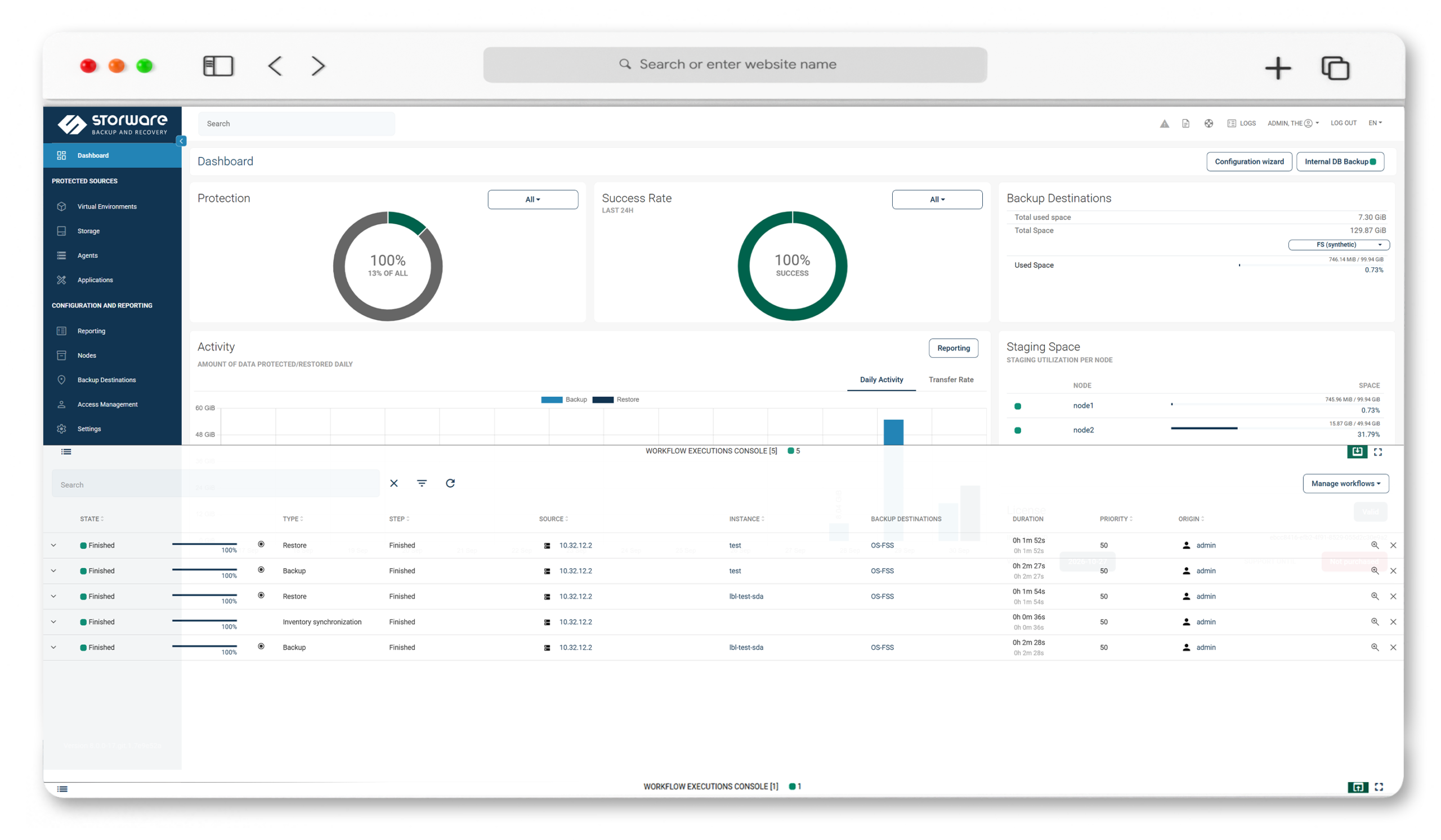
A lightweight agent installed on the protected system, configured and managed from a dedicated tab in the Storware interface.
Full and incremental file-level backups
Incrementals capture only what changed since the last backup, shrinking backup windows and storage requirements.
Granular selection and restore
Choose exactly what to protect — folders, files, or entire drives — and restore individual files or whole sets as the situation needs.
Physical and virtual hosts
Protect physical servers and workstations that have no hypervisor to snapshot, alongside virtual machines.
CephFS and RGW at file level
Mount a CephFS share, or RGW exposed as a file system, on an OS Agent host; the agent backs up the mounted path and its files, full and incremental.
OS Server metadata management
The OS Server, included with the Node, manages filesystem backup metadata. OS Agent backups keep metadata alongside the data, making the solution itself easy to protect and replicate.
Flexible destinations
File systems, S3-compatible and cloud object storage, and enterprise backup platforms.
One platform, one universal license
One platform, one universal license File-level protection under the same license and console as the agentless platform — no separate file-backup product to buy or run.
Technology partners






Our Interactive Architecture
Whether you manage infrastructure, automate deployments, or lead IT strategy, Storware works the way you work.

Click any category to expand · Click a solution for details & demo booking
Agentless by default. Agent-based by choice.
Storware's default is agentless — snapshot-based backup with nothing installed inside your VMs. But some workloads are better served at the file level. The OS Agent is that deliberate second option, not a fallback.

When agentless fits
VMs, private cloud, containers, and storage systems — protected through platform APIs, with no in-guest agents.
When the OS Agent fits
Physical machines, individual files and folders, and file or object shares like CephFS and RGW — where file-level granularity is the whole point.
One platform, both methods
Choose the right method per workload, manage from one console, and license under one model. The hybrid approach is the design, not a compromise.
File-level backup with the Storware OS Agent
See the OS Agent protect files and folders on Windows, Linux, and macOS — full and incremental backups, granular restore, and CephFS at file level.
Frequently Asked Questions
What is the Storware OS Agent?
A lightweight component installed on a protected system to enable file-level backup and recovery. It complements Storware’s agentless platform for cases where file-level granularity — or protecting a physical machine — is what’s needed.
Which operating systems are supported?
Windows, Linux, and macOS, on physical or virtual machines.
Isn't Storware agentless?
By default, yes — VMs, cloud, containers, and storage are protected agentlessly. The OS Agent is a deliberate, optional addition for file-level protection, not a replacement for the agentless approach.
What can I protect and restore?
Specific folders, individual files, or entire drives, using include and exclude rules. Recovery is granular — you can restore a single file rather than a whole volume.
Can I back up physical machines?
Yes. The OS Agent protects individual files on any host, physical or virtual, running Windows, Linux, or macOS.
How do I back up CephFS or object storage?
Mount the CephFS share, or RGW exposed as a file system, on a host running the OS Agent. The agent backs up the mounted path and its files, with full and incremental backups.
Do I need a separate license for file-level backup?
No. File-level protection is covered by the same universal license and managed from the same console as the rest of the platform.
Where are file-level backups stored?
On file systems, S3-compatible and cloud object storage, or enterprise backup platforms.