
Table of Contents
Every volume in your cloud can survive an incident, and the cloud can still be unusable.
If the databases behind Nova, Neutron, and Cinder are lost or corrupted, OpenStack may no longer have the information it needs to manage instances, networks, and volume attachments correctly. If Keystone’s Fernet keys are lost, tokens that depend on those keys can no longer be validated. Losing Keystone credential keys can also make stored credentials unreadable.
The control plane is relatively small in data volume but enormous in consequence. It is also the part of the cloud that teams sometimes assume is fully protected by clustering. Three Galera nodes can help a database cluster tolerate an individual node failure, but they do not replace backups. A dropped table, a faulty migration, or malicious changes can be replicated across the cluster.
The short answer: an OpenStack control plane backup strategy should cover consistent service database backups, deployment configuration, Keystone Fernet and credential keys, TLS certificates, and other required secrets. Backups must be stored outside the environment they protect, and recovery procedures must be tested regularly.
The exact tools and procedures depend on your OpenStack distribution. This guide explains the main components to protect, compares common distribution-specific approaches, and outlines a practical recovery process.
What the OpenStack control plane holds
The control plane consists of the services and supporting data that allow OpenStack to manage the cloud. Different components have different recovery requirements, so each should have a defined place in the backup plan.
| Component | What could be lost | Backup and recovery considerations |
| Service databases (MariaDB or MySQL, often using Galera) | Records describing projects, instances, ports, volume attachments, quotas, and other resources | Use the database backup method supported by your distribution. Define full and incremental backup intervals according to your recovery objectives. |
| Keystone Fernet keys | The ability to validate tokens that depend on the lost keys | Protect the key repository, encrypt backup copies, restrict access, and include key rotation in the recovery procedure. |
| Keystone credential keys | The ability to decrypt stored credentials, potentially including EC2 or application credentials | Back up the credential key repository securely and ensure the required keys are available at the intended recovery point. |
| Deployment configuration and inventory | The settings required to redeploy services consistently | Keep versioned copies of configuration, inventory, passwords, and deployment-specific files. Maintain a separate off-site copy. |
| TLS certificates and secrets | The ability to establish trusted service connections or retrieve required secrets | Back up certificates and private keys securely. Follow the backup and recovery procedures of secret-management systems such as Barbican or Vault. |
| Message queue (RabbitMQ) | Depending on the deployment, queued or in-flight messages and related state | Follow the distribution’s documented recovery procedure. Determine whether any queued or in-flight messages require special handling rather than assuming configuration alone is sufficient. |
| OVN or Open vSwitch databases | Logical networking state that may not be reconstructed automatically in every deployment | Confirm whether the relevant state can be resynchronized from Neutron or whether a separate recovery procedure is required. |
Keystone’s Fernet key repository is particularly sensitive. Treat it as secret configuration: encrypt backup copies, restrict access, and verify that the keys needed for the intended recovery point are available. Credential keys should be protected with the same care.
Backups should also be consistent with the state of the services they protect. A collection of configuration files and database files copied at unrelated points in time may not be sufficient to reconstruct a working cloud.
How different OpenStack distributions back up the control plane
Major OpenStack distributions provide their own tools and procedures for control plane backup and recovery. Use the documented procedure for your deployment rather than applying commands from another distribution.
The following table summarizes the approaches described in the respective documentation. Exact commands, supported components, backup locations, and recovery steps can vary by release and configuration.
| Distribution | Database backup approach | Other components to protect | Important consideration |
| Kolla-Ansible | Provides MariaDB backup and recovery tooling, including full and incremental backup options using Mariabackup | Deployment configuration, inventory, passwords, certificates, and other required files | Database backup scheduling and off-site copying must be arranged separately. Follow the documented MariaDB recovery procedure. |
| Canonical OpenStack (Sunbeam) | Provides a create-backup action for the database service in supported deployments | Depending on the deployment, backup planning may also need to cover the Kubernetes control plane, Juju controller and models, Vault, and related configuration | Follow the recovery instructions for the exact Sunbeam release and store production backups outside the cluster they protect. |
| Red Hat OpenStack Services on OpenShift (RHOSO) | Follow the supported database backup procedures for the deployed release | OpenShift resources, persistent volumes, configuration, and secrets, using the supported platform backup approach where applicable | Verify the current Red Hat guidance and the supported scope of the backup process for your deployment. |
| OpenStack-Ansible | Provides database backup procedures for the deployed services | The deployment configuration in /etc/openstack_deploy/, including relevant inventory, passwords, network information, and configuration options | Keep a separate copy of deployment configuration and follow the recovery procedure for the installed release. |
Two principles apply regardless of distribution.
First, backup scheduling is your responsibility unless your deployment explicitly provides and configures it. For example, Kolla-Ansible documentation describes a schedule using daily full backups retained for two weeks and hourly incremental backups retained for one day. This is a distribution-specific example, not a universal requirement for every OpenStack cloud.
Second, a backup stored inside the environment it protects may disappear in the same incident. Use an independent destination, such as external object storage or another suitably isolated backup repository. Confirm that the destination remains accessible during a site-level outage and that its credentials are not entirely dependent on the failed production environment.
Restoring a lost control plane
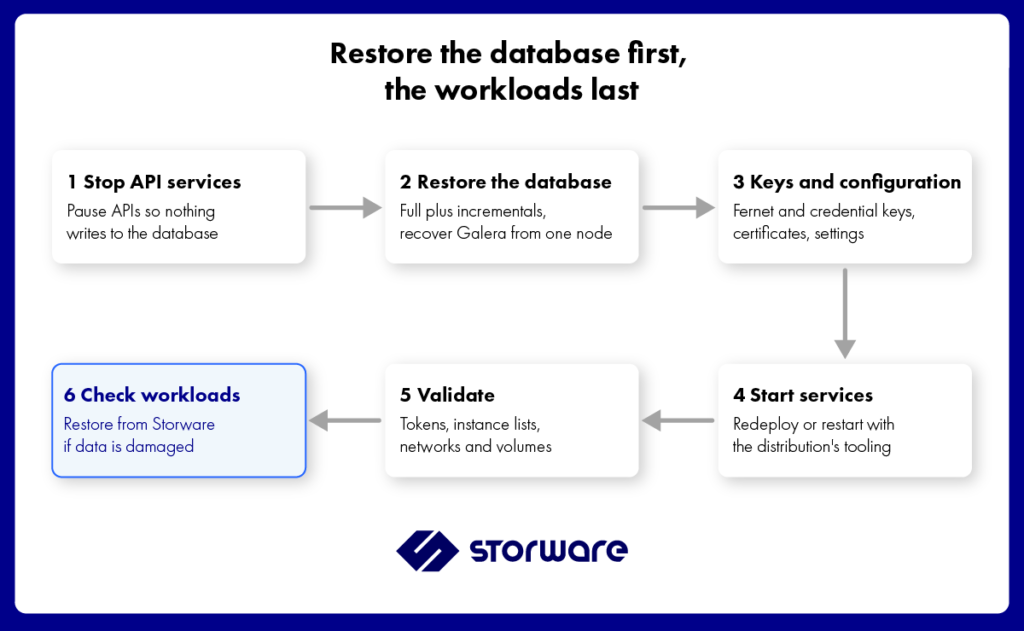
The exact commands differ by distribution and release. The recovery sequence must follow the supported procedure for the deployed architecture, but the overall objective is the same: restore consistent service data and configuration before relying on the cloud to manage workloads again.
1. Stabilize the environment
Identify the scope of the incident and prevent additional damage. If the control plane is still partially operational, stop or isolate affected services as required by the distribution’s recovery procedure so that they do not write inconsistent data during restoration.
Do not shut down or rebuild components indiscriminately. Preserve evidence and any surviving data that may be needed for recovery or investigation.
2. Restore the service databases
Restore the required databases from a consistent backup set. Use the database recovery procedure supported by the distribution.
For a Galera deployment, follow the documented cluster recovery process. Depending on the distribution and the state of the cluster, this may involve recovering one node and allowing the other nodes to rejoin. Kolla-Ansible provides its own MariaDB recovery tooling for supported deployments; do not assume the same commands apply to every OpenStack installation.
3. Restore keys, configuration, and certificates
Restore the deployment configuration, required Keystone Fernet and credential keys, TLS certificates, and other secrets. Make sure that the restored files correspond to the intended recovery point and the version of OpenStack being recovered.
Keys and secrets must be placed in the locations and permissions expected by the deployment. A database restored without the required keys or configuration may leave services unable to authenticate correctly or use stored credentials.
4. Recover the services
Use the distribution’s deployment and recovery tooling to bring the services back into operation. Confirm that the service configuration is consistent across the relevant nodes and that dependencies are available.
Avoid starting every component at once without following the documented order. Some services depend on the availability of databases, message queues, networking components, or other infrastructure.
5. Validate the control plane
Check that the cloud can authenticate users and that the core services report the expected state. Depending on the deployment, validation may include:
- Requesting a Keystone token.
- Listing projects and instances.
- Checking networks, ports, and volume attachments.
- Confirming that the relevant services are healthy.
- Comparing recovered resources with known-good records or monitoring data.
A successful service startup does not, by itself, prove that the control plane is consistent.
6. Validate workload availability
Restoring the control plane does not automatically restore lost instance data. If the underlying storage and compute resources remain available and consistent with the recovered control plane, workloads may be recoverable without restoring their data.
If workload data or required infrastructure is missing or damaged, use the appropriate workload recovery procedure. Validate storage, networking, compute capacity, and other dependencies before declaring the cloud operational.
Six mistakes that break control plane recovery
1. Treating Galera as a backup
Galera can help protect database availability against individual node failures. It is not a substitute for independent backups: unwanted changes can be replicated across the cluster.
Maintain consistent database backups that can be recovered independently of the running cluster.
2. Keeping backups on the controllers
Backups stored only on controller nodes or within the production cloud may be lost during a major incident.
Copy the required backup sets to an independent destination and test access to that destination without relying exclusively on production services.
3. Forgetting the Keystone keys
A restored database without the appropriate Keystone keys can leave tokens invalid or stored credentials unreadable.
Include Fernet and credential key repositories in the recovery plan. Store them securely and verify that the keys required for the intended recovery point are available.
4. Rotating keys without updating the recovery plan
Key rotation changes which key material is needed to support authentication and credential recovery. A backup strategy that ignores rotations can leave gaps between the restored database state and the available key repositories.
Back up key repositories after rotations or other relevant changes, and retain the versions required by your recovery policy. Follow Keystone’s documented key lifecycle and retention guidance.
5. Restoring a database from an incompatible release
OpenStack service schemas can change between releases. Restoring database files without considering the software version and upgrade state can introduce incompatibilities.
Take and verify suitable backups before upgrades, retain them according to your rollback policy, and follow the supported upgrade or downgrade recovery procedure. Do not assume that a database backup from another release can be restored directly.
6. Never rehearsing recovery
A control plane recovery may require coordinated actions across databases, services, configuration, and keys. A procedure that has never been tested can fail because of missing files, incorrect permissions, unavailable credentials, or undocumented dependencies.
Rehearse recovery in a test environment and repeat the exercise after major infrastructure, deployment, or configuration changes.
A practical OpenStack control plane backup schedule
The schedule below is a starting point, not a universal prescription. Database intervals should reflect the required recovery point objective (RPO), the business impact of losing recent changes, and the recommendations for your distribution.
| What to protect | Suggested starting point | Retention considerations |
| Database, full backup | Daily where appropriate for the deployment | Retain enough recovery points to meet operational and rollback requirements. Kolla-Ansible documentation provides a distribution-specific example of two weeks. |
| Database, incremental backup | Hourly where supported and justified by the RPO | Ensure the complete backup chain remains available and valid. Kolla-Ansible documentation provides a distribution-specific example of one day. |
| Fernet and credential keys | After each rotation or relevant change | Retain the key repositories required by the recovery policy and verify they match the intended recovery point. |
| Deployment configuration and inventory | After every change, using version control where appropriate | Keep versioned copies and a separate off-site copy. Protect secrets and passwords appropriately. |
| TLS certificates and other secrets | After changes or renewals | Retain valid copies and the recovery information needed to restore dependent services. |
| Off-site copies of control plane backups | According to the backup schedule | Follow a defined retention policy and confirm that the destination remains independent of production. |
| Full recovery rehearsal | Before major upgrades and at planned intervals, at least annually as a baseline | Keep test results, issues found, and evidence of remediation. Increase the frequency where the risk or applicable requirements demand it. |
The database intervals above reflect an example documented for Kolla-Ansible, not a requirement for every OpenStack distribution. Adapt the schedule to the deployment, recovery objectives, available tooling, and operational requirements.
A successful backup job is not proof of recoverability. Regularly test that backup sets can be read, that the required keys and configuration are available, and that the recovery process produces a working control plane.
Where Storware fits
Storware Backup and Recovery protects tenant workloads managed by OpenStack, including instances, associated data, and supported metadata. It does not replace the distribution-specific procedures required to recover the control plane services themselves.
Because Storware can be deployed outside the cloud it protects, backup data can be stored independently of the production environment. However, restoring OpenStack workloads requires a target environment with the necessary services, API access, authentication, and storage dependencies available.
This distinction matters during a real incident:
- If only the control plane is damaged: follow the recovery procedure for your OpenStack distribution. If the underlying storage and compute resources remain available and consistent, workloads may be recoverable without restoring their data.
- If workload data is also damaged or unavailable: restore the affected workloads from suitable backup copies after preparing the target environment.
- If recovery requires a different OpenStack environment: validate the target cloud and account for dependencies such as images, flavors, networking, permissions, access keys, and storage. Supported metadata and restore options can help with recovery, but some settings or resources may require additional configuration or mapping.
- If control plane backup files need off-site protection: Storware’s Linux OS Agent can copy previously created database backup files, deployment configuration, and key repositories to an off-site or otherwise suitably protected destination. Use the distribution’s supported procedure to create consistent database backups before protecting the resulting files.
Control plane backups and workload backups solve different problems. A resilient OpenStack disaster recovery strategy should plan for both, store recovery data independently of the production environment, and test the complete recovery process.
See Storware’s OpenStack backup and recovery solution and Linux OS Agent file-level backup for more information.
Frequently asked questions
What is the OpenStack control plane?
The control plane is the collection of services and supporting data that manage an OpenStack cloud. It includes API services, schedulers, Keystone, service databases, the message queue, and deployment configuration. It manages workloads and stores important metadata about them, while the primary contents of instance disks and application data generally reside in the underlying storage.
What should I back up in the OpenStack control plane?
At a minimum, plan for consistent service database backups, Keystone Fernet and credential keys, deployment configuration and inventory, TLS certificates, and required secrets. Depending on your distribution and architecture, networking state, message queue recovery, and other components may also require specific procedures.
Is Galera clustering enough to protect OpenStack databases?
No. Galera helps maintain database availability across nodes, but it does not replace independent backups. Unwanted changes can be replicated across the cluster. Keep consistent database backups in a separate destination and test that they can be restored.
What happens if Keystone Fernet keys are lost?
Tokens that depend on lost Fernet keys can no longer be validated, which may require users and services to authenticate again. Losing credential keys can make stored credentials unreadable. The consequences depend on which keys are lost and the deployment’s configuration, so both types of keys should be included in the recovery plan.
How often should the OpenStack control plane be backed up?
The schedule should reflect your RPO, business requirements, and the recommendations for your OpenStack distribution. Daily full database backups and hourly incrementals are one documented example for Kolla-Ansible, not a universal requirement. Back up configuration and key repositories after relevant changes, and ensure that off-site copies are available.
In what order should a lost control plane be restored?
Follow the supported recovery procedure for your distribution. In general, the process involves stabilizing the environment, restoring consistent databases, recovering required keys and configuration, bringing services back online, and validating the control plane and workload availability.
Does Storware back up the OpenStack control plane?
Storware Backup and Recovery protects tenant workloads and supported metadata; it does not replace the procedures required to recover OpenStack control plane services. Its Linux OS Agent can copy previously created control plane backup files to an off-site destination. Database backups must be created using a consistent, distribution-supported method.
Next chapter: Replication vs Backup in OpenStack: Choosing a DR Strategy
Protect the workloads your control plane manages.
Start a 60-day trial or talk to our engineers to discuss your OpenStack backup and recovery requirements.
Storware Backup and Recovery — Simplified. Scalable. Built for OpenStack workload protection.
Next chapter: Replication vs Backup in OpenStack: Choosing a DR Strategy
CTA block: Protect the workloads your control plane manages. Start a 60-day trial or talk to our engineers.
Storware Backup and Recovery. #1 Backup & DR for OpenStack. Simplified. Scalable. Proven.