
Table of Contents
OpenStack environments can use clustered controllers, replicated storage and compute-level high-availability mechanisms to tolerate individual component failures. However, these mechanisms do not replace disaster recovery. A deleted project, corrupted database, compromised administrative account or loss of an entire site can require recovery from independent backup copies.
High availability keeps the cloud running through a broken disk or a failed node. Disaster recovery brings it back after everything that was replicated has been damaged too. This guide covers the second part.
Short answer: OpenStack disaster recovery means being able to rebuild two things after a serious incident: the control plane (databases, configuration, keys) and the tenant workloads (instances, volumes and their metadata). Protect the control plane with your distribution’s backup procedures. Protect workloads with application-aware backups stored outside the cloud, ideally immutable, and add replication only where the RTO demands it. Then write the recovery down as a runbook and test it on a schedule.
What you must protect in an OpenStack cloud
An OpenStack cloud has three layers, and each fails and recovers differently. A DR plan that covers only one of them leaves the others to improvisation.
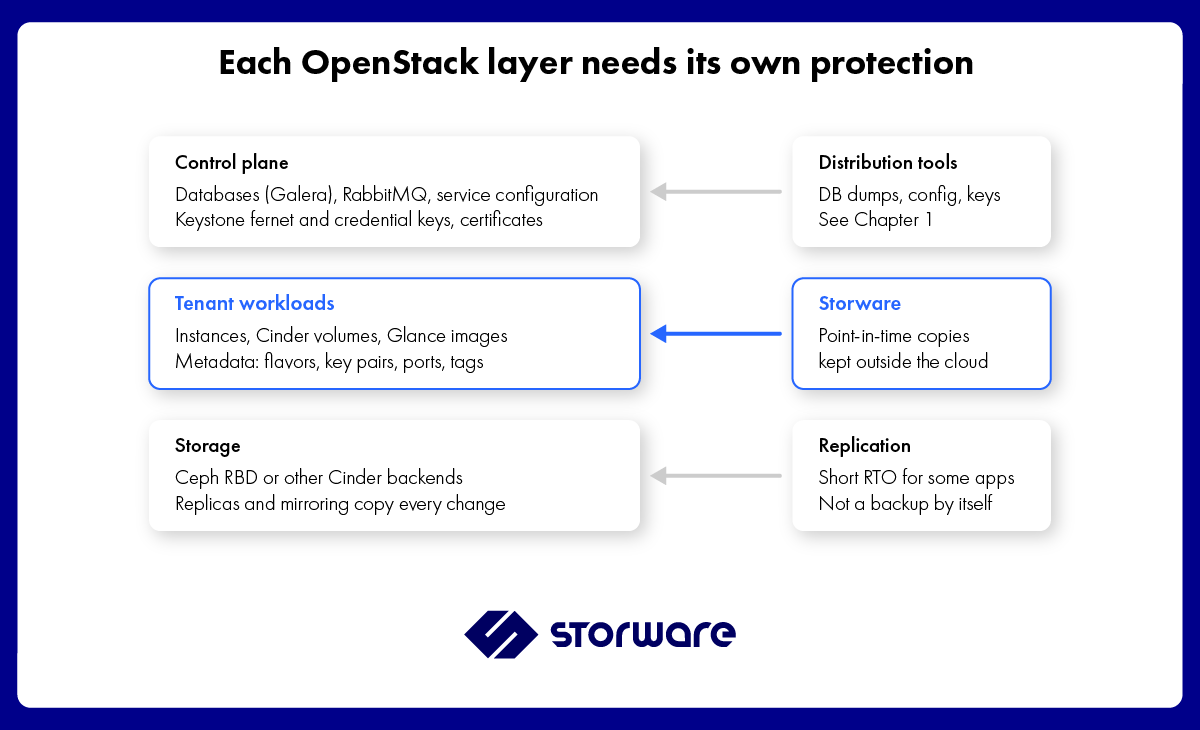
OpenStack layers and how each is protected
- Control plane. Without its databases and Keystone keys, a cloud cannot authenticate users or find its own resources, even if every volume survives. Distributions document control plane backup and restore, for example TripleO and OpenStack-Ansible.
- Tenant workloads. The instances and data your users care about. A volume without the metadata that defines its instance (flavor, key pair, ports, tags) is hard to bring back in a working state.
- Storage. Ceph keeps several replicas and can mirror to a second cluster. That protects against hardware failure, not against changes you want to undo.
Three DR strategies for OpenStack
Most OpenStack clouds combine these strategies rather than pick one. Replication shortens recovery for a few critical workloads; backups protect everything, including against the failures replication copies faithfully.
| Strategy | How it works in OpenStack | Protects against | Does not protect against | Fits |
| Backup and restore | Point-in-time copies of instances, volumes and metadata stored outside the cloud, restored to the same or another cloud | Deletion, corruption, ransomware, site loss (with an off-site copy) | Nothing, if copies are isolated; recovery time depends on restore speed | All workloads; the baseline for every cloud |
| Warm standby with storage replication | Cinder volume replication or Ceph RBD mirroring to a second cluster; instances rebuilt there after failover | Loss of the primary storage site, with short recovery | Deletion and corruption, which replicate to the secondary | Critical workloads with short RTO targets |
| Active-active across regions | Applications deployed in two OpenStack regions or clouds, traffic shifted between them | Region outage with near-zero downtime | Logical errors and attacks that reach both regions | Stateless or cloud-native services designed for it |
Two details shape these choices. Cinder replication behavior depends on the storage driver and replication configuration. In the documented backend-failover model, failover affects the replicated storage backend, and volumes that are not available on the secondary may require additional recovery actions. Ceph RBD mirroring replicates image changes to a peer cluster, either through journaling or snapshot-based replication, depending on the configuration. It can shorten recovery time after a site failure, but replicated deletions or corruption may also reach the secondary environment. It should therefore complement, rather than replace, independent backup copies. Chapter 2 compares the options in detail.
What this guide covers
Each chapter answers one decision in an OpenStack DR programme. Read them in order or jump to the one you face now.
- OpenStack Control Plane Backup and Recovery: what to back up on the controllers (databases, configuration, Keystone keys, certificates), how often, and how to rebuild a lost control plane.
- Replication vs Backup in OpenStack: Choosing a DR Strategy: Cinder replication, Ceph RBD mirroring and backups compared against RTO, RPO and the failures each one survives.
- Cross-Region Recovery for OpenStack: restoring workloads into another cloud or region, with flavors, images, networks and Keystone domains mapped correctly.
- OpenStack DR Runbook: A Template: a step-by-step runbook you can adapt, from declaring the incident to handing services back.
For how to prove the plan works, see Disaster Recovery Testing: How to Prove Your DR Plan Works.
How Storware supports OpenStack disaster recovery
Storware Backup and Recovery protects the tenant workload layer of an OpenStack cloud. Its backup architecture and recovery destinations should be designed so that workload recovery remains possible when the original cloud’s control plane is unavailable.
- Instances, volumes and metadata. Storware Backup and Recovery protects OpenStack instances and their associated data, together with supported instance and volume metadata. During recovery, administrators can configure relevant restore parameters, such as the target flavor and access key. Some resources and settings may require separate preparation or mapping in the target environment.
- Restore to another OpenStack. Backups can be restored to a different OpenStack cloud than the original, with a new flavor and key pair. If the image is missing in the target, Storware uploads it.
- Recovery Plans can be used to prepare and execute batch VM recovery and to schedule recovery operations for testing. For cross-cloud recovery, validate the target environment, restore parameters, networking, images, flavors, access keys, and other dependencies before relying on the plan during an incident.
- Incremental backups that fit the window. Changed-block tracking for Ceph RBD and Pure Storage, checksum-based incrementals for other Cinder backends.
- Copies protected from unauthorized modification. Depending on the configuration, immutable object storage, retention controls, air-gapped backup destinations, and offline tape can help protect recovery copies against unauthorized modification or deletion. Keep backup administration appropriately separated from production administration and verify that the selected protection mechanisms remain effective during recovery exercises. See Ransomware Recovery for the full approach.
- Multi-domain clouds. Scoped (per-domain) and unscoped Keystone authorisation for clouds with many domains.
Storware does not back up the OpenStack control plane itself. Chapter 1 shows how to cover it with your distribution’s tools and how the two layers fit together. Product details are on the OpenStack backup and recovery page and in the documentation.
FAQ
What is OpenStack disaster recovery?
OpenStack disaster recovery is the ability to restore a cloud’s control plane and tenant workloads after an incident that high availability cannot absorb, such as a site loss, data corruption or a cyberattack. It combines backups, optional replication and a tested runbook.
Is high availability enough for OpenStack?
No. Clustered controllers, Ceph replicas and instance HA keep services running through hardware failures, but they replicate deletions, corruption and malicious changes instantly. Disaster recovery needs point-in-time copies kept outside the cloud.
Is Ceph replication a backup?
No. Ceph replicas and RBD mirroring copy every change, including unwanted ones, to the other copies. A backup keeps earlier versions you can return to after a deletion or an attack.
What should be backed up in OpenStack?
Two layers. The control plane: databases, service configuration, Keystone fernet and credential keys, and certificates. The workloads: instance volumes, images and the metadata that defines each instance, such as flavors, key pairs, ports and tags.
Can OpenStack workloads be restored to a different cloud?
Yes, if the backup includes metadata and the restore tool can map flavors, images and networks in the target. Storware restores to a different OpenStack and uploads the image if the target lacks it.
How often should OpenStack disaster recovery be tested?
Test frequency should reflect the criticality of workloads, recovery objectives, and applicable regulatory requirements. A practical approach is to test representative workload restores regularly, exercise complete recovery procedures at planned intervals, and repeat relevant tests after major infrastructure or configuration changes. Under DORA, in-scope financial entities other than microenterprises must ensure that appropriate tests are conducted at least yearly on ICT systems and applications supporting critical or important functions.
Does Storware back up the OpenStack control plane?
No. Storware protects tenant workloads and their metadata. The control plane is protected with your distribution’s backup procedures, covered in Chapter.