
Table of Contents
Some incidents take out more than a rack or a storage array. A data centre loses power for days, a flood makes the facility inaccessible, or an attacker gains administrative control of an entire cloud.
In each case, the question is the same: Can you bring your workloads up somewhere else, and how long will it take?
Cross-region recovery is where many OpenStack disaster recovery plans stop being specific. The backups exist, and a second site is available, but nobody has verified whether an instance backed up in one cloud can actually start in another—with the right flavor, image, network, storage, and access configuration.
The short answer: to recover OpenStack workloads in another region or cloud, prepare three things before an incident:
- Accessible backup copies stored outside the primary site’s failure domain and readable from the recovery environment.
- A prepared target cloud with the required projects, flavors, images, networks, storage capacity, and quotas—or documented mappings to equivalent resources.
- A tested recovery plan that defines the recovery order, target resource mappings, validation steps, and traffic cutover.
Availability zones alone are not a substitute for site-level disaster recovery. A separate region or independent OpenStack cloud can provide stronger separation, but the appropriate design depends on which failures you need to survive. Test the complete recovery path regularly, including the availability of backup management components and the process of bringing applications back online.
Availability zones, regions, or a separate cloud?
OpenStack environments can provide different levels of separation. The important question is which components remain shared between the primary and recovery environments.
| Level | What it is | What may be shared with the primary | Typical recovery scope |
| Availability zone | A grouping of compute resources used to place workloads | Control plane, site, identity services, and potentially storage or other infrastructure | Selected host or rack failures, if the underlying architecture provides the required fault isolation |
| Region | A distinct set of compute, storage, and service endpoints, often in another data centre | Depending on the architecture, identity services and other control plane dependencies | Site-level recovery when the required shared services remain available or have their own recovery plan |
| Separate OpenStack cloud | An independent deployment with its own control plane, located at another site or operated by a provider | Only the dependencies deliberately shared or copied between environments | Recovery from a site failure and, with appropriate separation, loss or compromise of the primary control plane |
The Nova documentation is explicit that availability zones “should not be assumed to map to fault domains” and “provide no intrinsic HA benefit by themselves” (Nova availability zones). They help spread workloads; they do not protect against a site or control plane failure.
A multi-region deployment may be less expensive to operate than two independent clouds, but shared identity or management components can become dependencies during an incident. A separate cloud requires more preparation and operational effort, but it can provide greater independence when the primary control plane or its administrative credentials are compromised.
Choose the target architecture based on the failure scenarios, recovery objectives, and dependencies you need to isolate—not simply on the number of regions configured in OpenStack. A backup contains data and supported metadata. It does not automatically create every resource that the metadata refers to.
What must exist in the target before you restore?
A backup contains data and supported metadata. It does not automatically create every resource that the metadata refers to. Before an incident, decide which target resources will be created in advance and which will be mapped during recovery. Record those decisions in the disaster recovery runbook.
| Resource | Why it matters | Prepare in advance |
| Keystone domains and projects | Workloads need to be restored into the correct administrative and tenant context | Create the required domains and projects, or document how source projects map to target projects |
| Flavors | The target needs a suitable compute configuration for each restored instance | Create equivalent flavors or maintain a mapping table |
| Images | Instances that depend on Glance images need those images available in the target | Pre-stage critical images or verify that the selected recovery workflow can upload missing images |
| Networks, subnets, and routers | Restored instances need network connectivity | Pre-create the required networks and subnets; decide whether addresses will be preserved or changed |
| Security groups | Instances need the intended network access rules | Recreate and validate security groups, preferably using infrastructure as code where practical |
| Key pairs | Administrators and users may need access to restored instances | Make the required public keys available in the target projects and define which key pair will be assigned during recovery |
| Volume types and storage capacity | Restored volumes need compatible storage and sufficient capacity | Map volume types to supported target backends and reserve enough capacity and performance for the recovery workload |
| Quotas | Project limits can prevent restoration from completing | Check quotas and adjust them in advance for the workloads expected during a disaster |
| DNS, load balancers, and certificates | Users need to reach the applications at the recovery site | Document the traffic cutover, DNS TTLs, load balancer configuration, and certificate requirements |
| Backup management and catalog | Recovery depends on being able to locate and read the correct backup copies | Ensure the backup management components and catalog can remain available or be recovered without relying on the primary site |
The target does not necessarily need identical resources. It needs compatible resources and a documented mapping from the original environment.
Infrastructure as code can help keep networks, security groups, flavors, and other dependencies aligned between environments. Heat templates or Terraform configurations can reduce manual work, provided they are versioned, accessible during a disaster, and tested against the target cloud.
Do not assume that all configuration can be recreated automatically during restore. Verify which resources are included in the backup and which must be provisioned separately.
Cross-region recovery, step by step
During a real incident, restoring data is only one part of recovery. Teams can lose valuable time deciding where to recover, which backup to use, which resources are missing, and how to redirect users. A repeatable recovery process makes those decisions in advance.
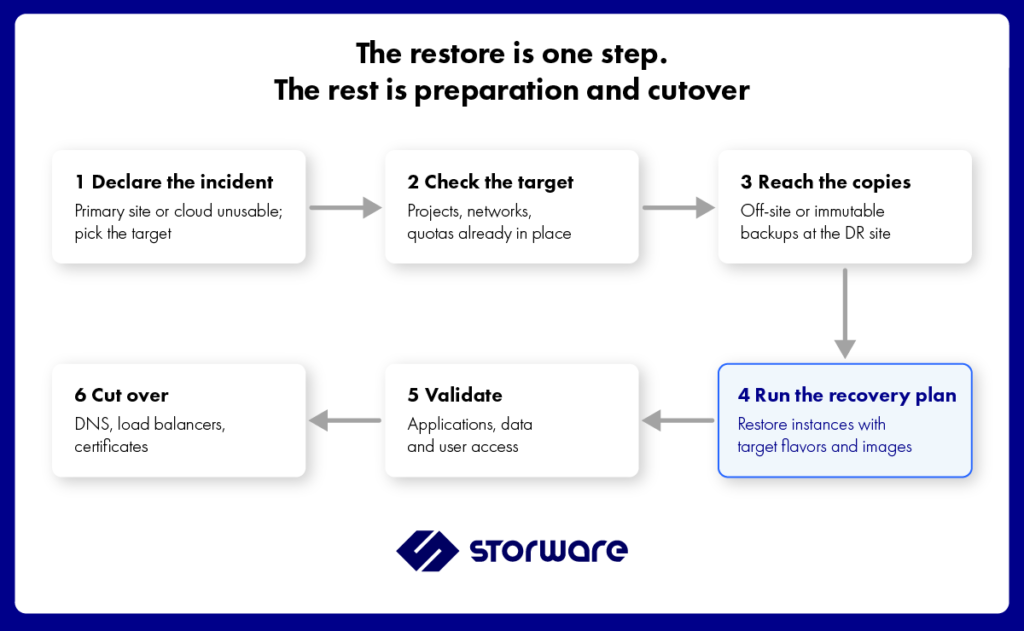
Step 1: Declare the incident and choose the target
Define who has the authority to declare a disaster and initiate recovery. Agree on the criteria for switching to the recovery site rather than waiting for the primary environment to return.
Record the target cloud, the recovery priorities, and the decision-making process in the runbook.
Step 2: Check the target environment
Confirm that the required projects, networks, security groups, flavors, quotas, storage resources, and other dependencies exist and are available.
Check compute capacity and confirm that the target can support the workload set selected for recovery. If the target differs from the primary, verify that the documented mappings are still valid.
Step 3: Access the backup copies
Confirm that the recovery environment can read the required off-site backup data and locate the relevant backup catalog or metadata.
Select the recovery point based on the incident. The newest backup is not always the safest choice if the primary environment has been compromised or data corruption may have begun before the incident was detected.
If there is a suspected security incident, follow the relevant investigation and containment procedures before selecting a recovery point.
Step 4: Execute the recovery plan
Restore workloads in priority order, using the target flavors, images, networks, and other supported restore parameters.
Validate the prerequisites for each group before starting the restore. Monitor progress and capture errors that require manual intervention. Do not assume that a successful data restore means the application is already available to users.
Step 5: Validate applications and data
Confirm that the restored instances boot, required services start, and the applications behave as expected.
Check data freshness, connectivity, authentication, security rules, and any application-specific dependencies. Have application owners validate critical services before declaring recovery complete.
Step 6: Cut over traffic
Once the recovery environment has passed validation, redirect users and dependent systems to the recovered services.
Depending on the architecture, this may involve changing DNS records, updating load balancers, confirming certificates, and checking external integrations.
Monitor the recovered applications after cutover and document any outstanding issues.
Plan failback as well
Recovery is not complete simply because the primary site becomes available again. Data created or changed at the recovery site must be reconciled with the primary environment before workloads can safely move back.
Define who authorizes failback, how data is synchronized, how conflicting changes are handled, and how the final switch is tested. Do not treat failback as an automatic reversal of failover.
Chapter 4, OpenStack DR Runbook: A Template, turns this process into a repeatable operational checklist.
Getting backups to the second site
A backup stored only at the primary site may be lost in the same incident that makes the cloud unavailable. Cross-region recovery starts with copies the recovery environment can access independently.
There are several ways to achieve this.
Option 1: Back up directly to off-site storage
Write backups to object storage or a file system located at the recovery site or in another suitable location.
This approach can simplify the path between backup creation and off-site protection. However, every backup transfer must cross the network, so available bandwidth, latency, and the daily change rate affect the backup window.
Option 2: Keep a local copy and copy it to a second destination
Store backups locally for routine restores, then copy them to a separate destination at the recovery site.
This can balance local recovery performance with off-site protection. The copy process needs monitoring, and the recovery team must be able to determine which backup sets have successfully arrived at the second site.
Option 3: Use object storage replication
S3-compatible storage may offer replication between buckets or locations. Verify the behavior of the specific provider and configuration, including whether object versions, retention settings, and Object Lock protections are preserved as required.
Do not assume that replication of object data automatically reproduces all the security and retention properties of the source bucket.
Option 4: Add an offline or air-gapped copy
Tape or an appropriately isolated air-gapped destination can provide another layer of protection when an attacker has compromised credentials used across the production and recovery environments.
The effectiveness of this protection depends on the actual isolation, access controls, retention settings, and procedures used to retrieve the copy.
Size the network for the change rate
For incremental backups, estimate the amount of changed data that must be transferred during the backup window rather than relying only on the total protected capacity.
The actual transfer volume depends on the backup method, change rate, compression, deduplication, and other configuration details. Monitor the transfer process and account for periods of unusually high change activity.
Finally, ensure that the recovery site can access the backup catalog and the information needed to locate the correct recovery points. If catalog access or backup management depends entirely on a server at the primary site, that dependency can delay or prevent recovery.
The backup data, catalog, required credentials, and recovery instructions must all be considered part of the disaster recovery design.
Where Storware fits
Storware Backup and Recovery can protect OpenStack workloads and support recovery into another OpenStack cloud when the relevant recovery workflow is supported. This makes it a potential part of a cross-region strategy, alongside a prepared target environment and a tested operational runbook.
The following capabilities are relevant to cross-cloud recovery. Confirm the supported options for your product version and configuration before relying on them in a recovery plan.
Restore into a different OpenStack cloud
Storware supports restoring backups to a different OpenStack cloud from the source environment.
During recovery, administrators can select a target flavor. If the source image is missing from the target, Storware can upload the image to Glance as supported by the restore workflow.
A different target cloud may have different projects, networking, storage, and security settings. Those resources must be prepared or mapped as required. Do not assume that restoring an instance automatically recreates every dependency in the target environment.
Restore supported metadata with the workload
The backup can include supported instance, volume, and port metadata, such as user data, tags, and properties.
The exact metadata available for restoration depends on the supported workflow and configuration. Verify critical settings and validate the restored instance after recovery; some resources or settings may need to be prepared or mapped separately in the target cloud.
Select a target key pair
Where supported by the restore workflow, administrators can select a key pair in the target project during restoration.
Prepare the required public keys and access procedures before an incident. Confirm that the selected key pair provides the intended access to the restored instance and that other authentication requirements are met.
Use recovery plans
Recovery plans can help define a repeatable sequence for restoring groups of instances, including supported restore settings and target information.
Before relying on a recovery plan for cross-cloud recovery, verify that the product version supports the intended target scenario. Test the plan with the target cloud’s actual projects, flavors, images, networking, storage, and permissions. Scheduled tests can help identify configuration drift, but they do not replace a complete disaster recovery exercise.
Protect backup copies at the second site
Storware supports backup destinations that can include file systems, S3-compatible object storage, and tape, depending on the configuration. Additional protection options can include Object Lock, Retention Lock, and the isoLayer air-gapped destination.
These mechanisms can help protect recovery copies against unauthorized changes or deletion when configured appropriately. Validate the destination’s retention behavior, administrative separation, and recovery access rather than assuming that all protection properties are automatically preserved when data is copied between locations.
Make the backup platform recoverable too
Cross-region recovery depends on more than the workload backup files. The team also needs access to the backup catalog, management components, required credentials, and recovery procedures.
Determine how those components will remain available or be recovered if the primary site is completely inaccessible. Validate the design with your technical team, including any requirements for a second instance or restoration of the backup server configuration.
The target cloud still needs the projects, networks, security groups, quotas, and other dependencies described earlier. Storware complements that preparation with workload backup and recovery; it does not eliminate the need to design the target environment.
Networks, security groups and quotas in the target still need preparing, as described above. See Storware for OpenStack and the OpenStack documentation.
FAQ
What is multi-region disaster recovery in OpenStack?
Multi-region disaster recovery is the ability to recover workloads in another OpenStack region or cloud after an incident affects the primary environment. It requires accessible backup copies, a prepared target environment, a defined recovery process, and testing that demonstrates the workloads can actually run at the recovery site.
Are OpenStack availability zones enough for disaster recovery?
Not necessarily. Availability zones can help distribute workloads, but their names do not guarantee independent fault domains. They may share the same control plane, data centre, or other critical infrastructure. For site-level recovery, assess whether a separate region or independent OpenStack cloud is required.
Should the recovery site be a region or a separate OpenStack cloud?
A region may be simpler and less expensive to operate, but the architecture may share identity services or other dependencies with the primary. An independent OpenStack cloud can provide greater separation from failures or compromise of the primary control plane, at the cost of additional infrastructure and operational work. Choose based on the failure scenarios and recovery objectives you need to meet.
What must be prepared in the target cloud before a restore?
Prepare or map the required domains and projects, flavors, images, networks, security groups, key pairs, volume types, storage capacity, and quotas. Also plan DNS and load balancer cutover, certificates, access controls, and the dependencies required by the applications. Verify which of these resources the selected restore workflow can configure and which must be created separately.
Can I restore an OpenStack instance into a different cloud?
Yes, where the backup platform supports the target recovery workflow. Storware supports restoring to another OpenStack cloud, including target flavor selection and image upload when the source image is missing from the target. The target environment still needs compatible resources, permissions, networking, storage, and other dependencies. Validate the complete process before relying on it during an incident.
How do backups get to the recovery site?
Common approaches include writing backups directly to off-site storage, copying local backups to a second destination, or using replication features provided by object storage. An offline or air-gapped copy can provide additional separation. Verify that the recovery site can access both the backup data and the catalog or metadata needed to locate the correct recovery points.
Do IP addresses change when workloads are recovered in another region?
They may. Whether an address can be preserved depends on the network architecture and how the target environment is configured. Decide in advance whether workloads will use the same addressing or new addresses, and document the corresponding DNS, routing, firewall, and load balancer changes.