

Backup and Recovery for VMware vSphere and ESXi
Storware protects VMware vSphere and ESXi agentlessly, through VMware's own APIs (VADP) — nothing in your guests, nothing on the hypervisor OS. Full and CBT incremental backups, instant restore, and a direct migration path from VMware to OpenStack.
Key Highlights

Agentless and certified
Backup through VADP, with no agents in guests and no access to the hypervisor OS. Nothing to deploy or patch inside your VMs.

Freedom of choice
No vendor lock-in on hypervisor or destination. Protect across platforms and send backups to file systems, object storage, or enterprise backup providers.

Simple, transparent licensing
Per-VM or per-socket, one platform, one model — with 24/7 human support. No feature tiers, no per-platform fees.
Fast recovery, minimal downtime
Instant restore boots a VM straight from backup storage; Live Storage Migration moves it to production storage in the background.
Powerful Data Protection Features
Agentless backup via VADP
Storware reads virtual disks through VMware's vStorage APIs for Data Protection. No agent footprint, no hypervisor OS access.
Hot-Add and NBD transport modes
Storware selects the fastest available path: LAN-free Hot-Add when the proxy shares datastore visibility, with automatic fallback to NBD over the management network.
CBT incremental backups
Incrementals use VMware's Changed Block Tracking, reading only changed blocks. Storware auto-detects CBT and resets it on each full backup to keep a reliable baseline.
Synthetic backups
Incrementals are synthesized into a complete, independent image, so there's no backup-chain merging at restore time — faster recovery that scales across large VM estates.
Instant restore + Live Storage Migration
Mount a VM directly from backup storage as a temporary vCenter datastore and power it on in moments; Storage vMotion then relocates it to production storage without interruption.
Granular and disk-level restore
Recover a full VM, individual virtual disks, or single files — to the original location or an alternate ESXi host or datastore.
VMware recovery to OpenStack
Restore VMware backups directly into OpenStack, with no intermediary conversion tooling (VMware → OpenStack)
Recovery Plans with schedulable DR testing
Define multi-step recovery workflows, including network and disk-layout changes, and run them on a schedule for non-disruptive recoverability validation
Open REST API and policy assignment
A documented REST API for self-service and third-party integration; assign VMs to policies by VM tag or name regex.
Technology partners











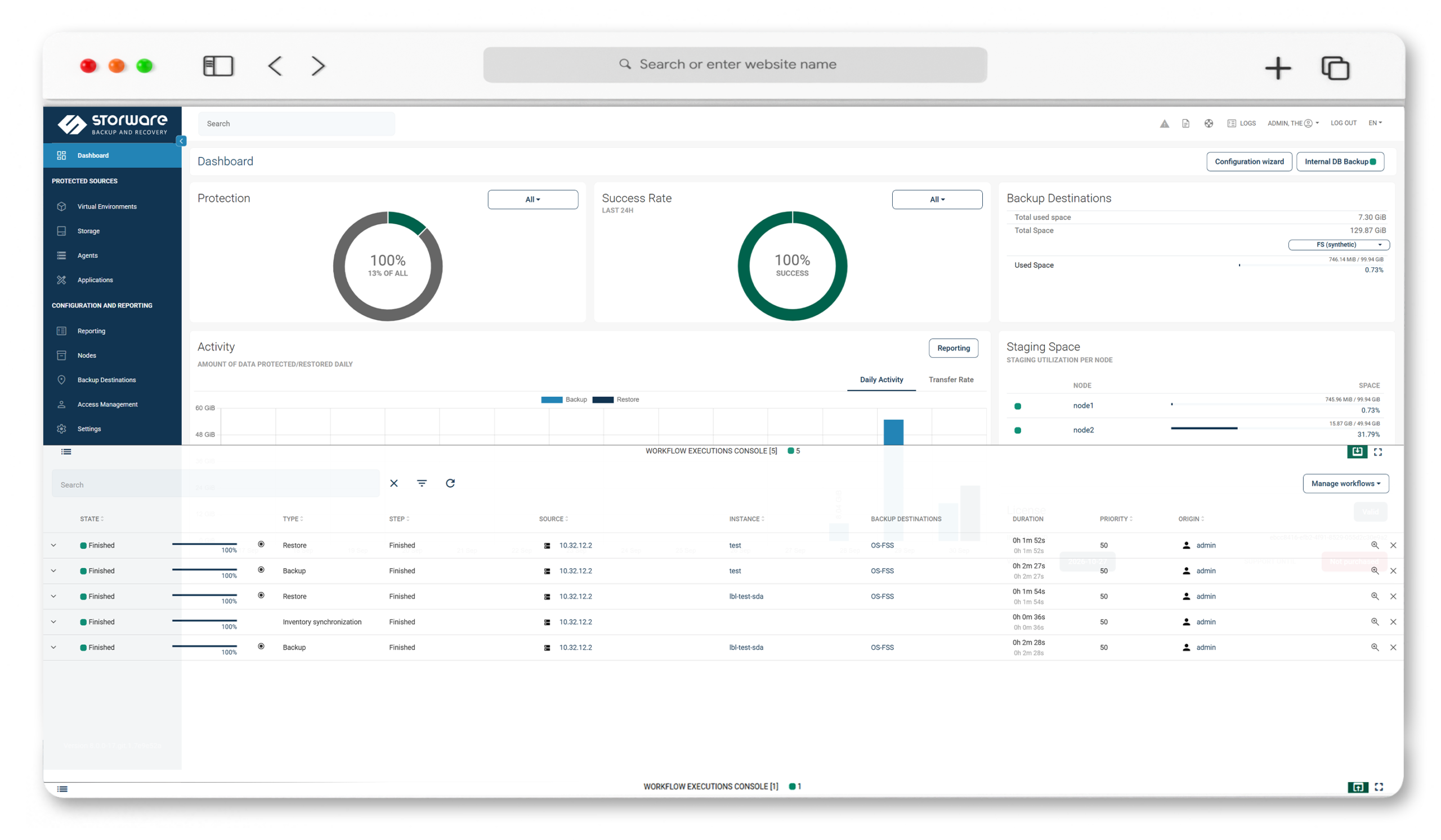
See Storware Backup and Recovery for VMware in action
Adding a vCenter or standalone ESXi host takes minutes — from there, watch Storware run image-based backups over Hot-Add and NBD, capture CBT incrementals, and recover a VMware VM through instant restore. No agents, no separate console: full and granular recovery, straight from the Storware WebUI.
How Storware protects VMware — pod prosty diagram Connect → Protect → Recover.
IT teams today manage sprawling environments across virtualization, containers, cloud, and storage. Each demands its own backup approach. The complexity grows faster than the solutions.

Connect
Add vCenter or a standalone ESXi host. Storware works through the vSphere APIs (VADP) over port 443 — no agents, no changes to your VMs.
Protect
Image-based full backups and CBT incrementals move over Hot-Add (LAN-free) or NBD, auto-selected. Application-consistent quiesced snapshots and pre/post command execution keep data recoverable.
Recover
Restore a full VM, individual disks, or files; boot instantly from backup with Storage vMotion to production — or migrate the VM straight to OpenStack.
Frequently Asked Questions
Is Storware agentless for VMware?
Yes. Storware protects VMware VMs through VMware’s vStorage APIs for Data Protection (VADP), with no agents inside guests and no access to the hypervisor OS.
Which VMware vSphere and ESXi versions are supported?
Storware supports vSphere/ESXi 7.0, 8.0, and 9.0. Always confirm against the current documented version at docs.storware.eu.
How does Storware perform incremental backups for VMware?
Through VMware’s Changed Block Tracking (CBT), reading only changed blocks. Storware auto-detects CBT and resets it on each full backup to maintain a reliable change baseline.
What transport modes does Storware support?
Hot-Add and NBD. Storware attempts LAN-free Hot-Add first when the proxy shares datastore visibility, then falls back to NBD over the management network.
Does Storware offer instant recovery for VMware VMs?
Yes. Instant restore mounts the backup as a temporary vCenter datastore and boots the VM in moments; Live Storage Migration (Storage vMotion) then moves it to production storage without interruption. Instant restore requires a synthetic-type backup destination.
What restore options are available?
Full VM recovery, individual virtual disk restore, file-level restore, restore to an alternate ESXi host or datastore, restore to the Storware node, instant restore, and recover to OpenStack.
Can I restore VMware VMs to OpenStack with Storware?
Yes. Storware restores VMware backups directly into OpenStack.
Does Storware support application-consistent backups?
Yes. Storware takes quiesced (application-consistent) snapshots and supports pre/post snapshot command execution.