
Table of Contents
Ceph RBD stores block devices for virtual machines, Kubernetes volumes and OpenStack instances in thousands of data centres. It is also where backup windows quietly grow: every image lives in a distributed pool, and reading all of it every night stops being realistic once a cluster reaches hundreds of terabytes.
The fix is not a faster pipe. It is reading less. Ceph already knows which parts of a volume changed between two snapshots, and a backup platform that asks Ceph for that list can skip everything else.
Short answer: an incremental Ceph RBD backup takes a new snapshot, asks Ceph for the extents that changed since the previous snapshot (a snapshot differential, the same information rbd diff returns), and reads only those blocks. With the object-map and fast-diff image features enabled, Ceph computes that list from metadata instead of scanning data. Storware Backup and Recovery uses this approach in two ways: directly against a Ceph cluster, and for OpenStack volumes that live on Ceph.
Why full copies of Ceph volumes stop scaling
A full backup reads every allocated block of every protected volume. On a small cloud that is fine. On a large one, the arithmetic decides for you.
Take an illustrative cloud with 200 TB of RBD images and a sustained backup throughput of 1 GB/s. A full pass takes about 56 hours. If 3% of that data changes per day, an incremental pass reads roughly 6 TB and finishes in under two hours.
The difference is not only time. Every block read is load on OSDs that also serve production I/O, and every block transferred consumes network and backup storage. Reading less protects three things at once:
- Backup windows that fit inside the night, so RPOs stay realistic as the cloud grows.
- Production performance, because Ceph serves fewer backup reads alongside tenant traffic.
- Backup storage and network capacity, because only changed data crosses the wire.
How Ceph tracks changed blocks
Ceph does not need a separate change journal. Snapshots and image metadata already hold what a backup needs.
RBD snapshots. A snapshot is a read-only, point-in-time copy of an RBD image. On an OpenStack cloud with a Ceph backend, a Cinder volume snapshot becomes an RBD snapshot underneath.
Snapshot diff. Ceph can list the byte extents that changed between two snapshots of the same image. This is what the rbd diff --from-snap command returns: offset, length, and whether each extent holds data or zeros. Zeroed or discarded regions are reported as such, so they need not be read.
object-map and fast-diff. RBD images are striped across RADOS objects, 4 MB each by default. The object-map feature tracks which objects exist; fast-diff builds on it to compute snapshot differences from that map rather than by querying every object. On large volumes this turns a diff from a scan into a metadata lookup. Both features depend on exclusive-lock.
What that means for backup: with two snapshots and fast-diff enabled, a backup tool learns precisely which regions to read from metadata, without scanning the volume. The Ceph documentation covers these commands and features in the rbd manual and RBD snapshots.
How Ceph tracks changed blocks
Ceph does not need a separate change journal. Snapshots and image metadata already hold what a backup needs.
RBD snapshots. A snapshot is a read-only, point-in-time copy of an RBD image. On an OpenStack cloud with a Ceph backend, a Cinder volume snapshot becomes an RBD snapshot underneath.
Snapshot diff. Ceph can list the byte extents that changed between two snapshots of the same image. This is what the rbd diff --from-snap command returns: offset, length, and whether each extent holds data or zeros. Zeroed or discarded regions are reported as such, so they need not be read.
object-map and fast-diff. RBD images are striped across RADOS objects, 4 MB each by default. The object-map feature tracks which objects exist; fast-diff builds on it to compute snapshot differences from that map rather than by querying every object. On large volumes this turns a diff from a scan into a metadata lookup. Both features depend on exclusive-lock.
What that means for backup: with two snapshots and fast-diff enabled, a backup tool learns precisely which regions to read from metadata, without scanning the volume. The Ceph documentation covers these commands and features in the rbd manual and RBD snapshots.
Two ways Storware protects Ceph RBD
Storware reads Ceph RBD in two ways, depending on who owns the volumes. Both rely on Ceph snapshot differentials, so after the first full backup only changed blocks are copied.
| Standalone Ceph RBD | OpenStack volumes on Ceph | |
|---|---|---|
| Typical owner | Storage or platform team running Ceph for VMs, containers or applications | Cloud team running OpenStack with Cinder on Ceph |
| How Storware connects | Storware Node talks directly to the Ceph monitors | Through the Cinder API, with a proxy VM inside the cloud |
| How data is read | RBD snapshot mapped on the node over RBD-NBD | Temporary volume from the snapshot, attached to the proxy VM |
| Incremental method | RBD snap-diff | Ceph changed-block tracking |
| Restore options | Full volume, single items, file access over iSCSI | Full instance, single volume, individual files |
| Policy assignment | Rules on RBD image names | Rules on instance names and tags |
Path 1: standalone Ceph RBD volumes
When Ceph serves block devices outside OpenStack, Storware treats the cluster itself as a backup source. The Storware Node connects to the Ceph monitors, maps each RBD snapshot locally over RBD-NBD and reads only the extents that changed since the previous backup.
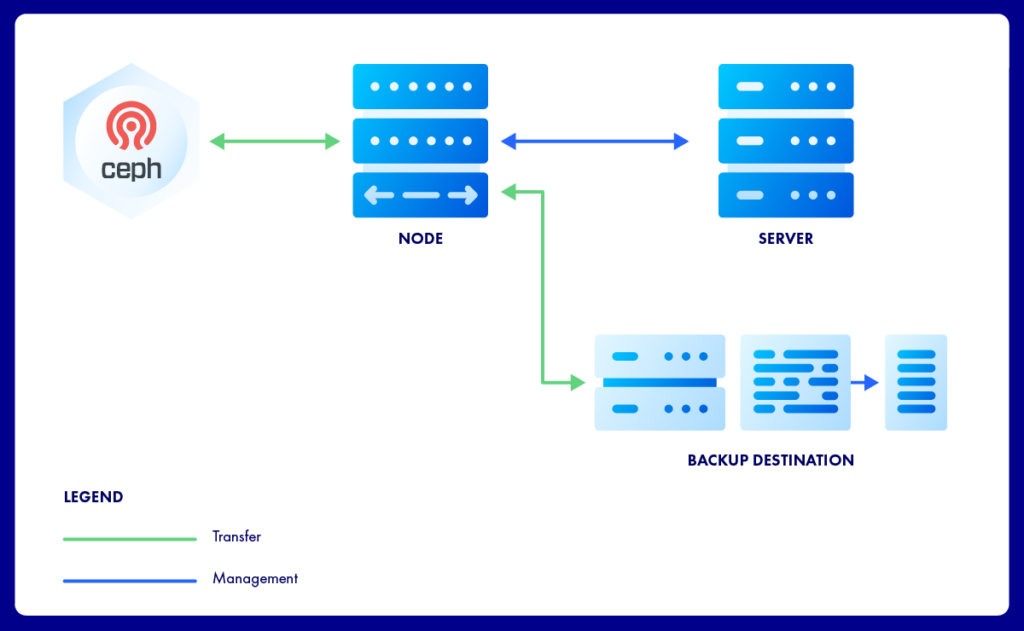
The Server manages policies; all data moves between Ceph, the Node and the backup destination.
What this path adds:
- Granular restore. Restore a whole volume or single items, or expose backed-up files over iSCSI to another system.
- Policy auto-assignment by name. A rule such as “image name contains prod-db” puts every matching RBD image under the right policy, including images created later.
- Application-consistent snapshots. Pre and post snapshot scripts can quiesce a service just before the snapshot and resume it straight after.
- Cyclic snapshot rotation. Storware can keep a defined number of snapshots on Ceph for a defined period. They give fast local rollback, while backups provide the off-cluster copy.
Requirements: Ceph 14.2 Nautilus or newer, or Red Hat Ceph Storage 4.0 or newer; the rbd-nbd and ceph-common packages on the Storware Node; a Ceph keyring and a ceph.conf file with the monitor addresses. See Ceph and storage provider backup for the full overview.
Path 2: OpenStack volumes on Ceph
For OpenStack clouds, Storware Backup and Recovery for OpenStack uses the disk attachment strategy. For each volume it selects the incremental method automatically: native changed-block tracking on Ceph RBD, checksum-based processing on other Cinder backends. No agent runs inside the protected instance.
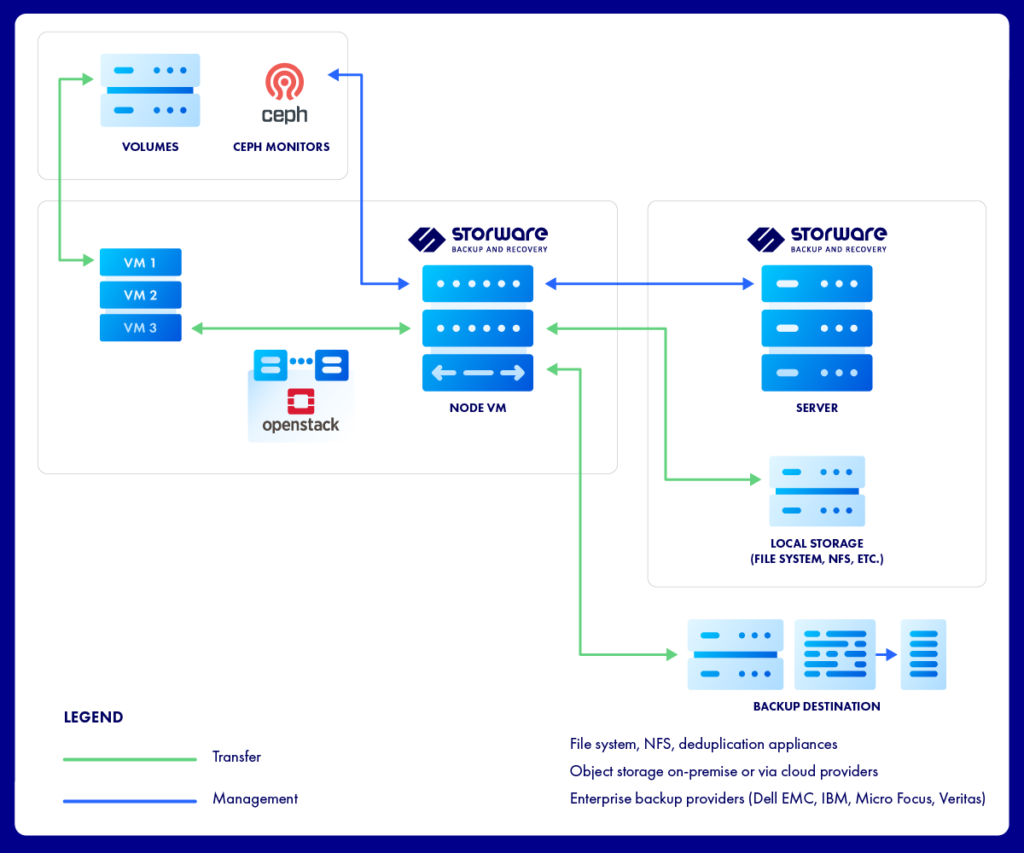
The production cloud does the snapshotting; Ceph supplies the change list; the Storware Node reads only what changed.
- Snapshot. At the scheduled time, the Storware Server starts the task and the Storware Node asks the Cinder API for a crash-consistent snapshot of each instance volume. On a Ceph backend this becomes an RBD snapshot.
- Attach. A temporary volume is created from the snapshot and attached to the proxy VM that runs the Storware Node, one volume at a time.
- Ask Ceph what changed.The Server manages policies; all data moves between Ceph, the Node and the backup destination. The Storware Node queries the Ceph monitors for the list of changed blocks since the previous backup.
- Read and transfer. Only those blocks are read from the attached volume and written to the backup destination: a file system, S3-compatible object storage with Object Lock, or tape.
- Clean up. The temporary volume is detached and removed. Backup data can be restored as a full instance, a single volume, or individual files.
The first backup of a volume is a full copy. Every following run is incremental, and restores work from any recovery point within the retention period. Storware documents the configuration in the OpenStack protection guide.
Requirements and practical tips
Most problems with Ceph incremental backups come from three places: network access, image features and proxy capacity.
Requirements for the OpenStack path
- Monitor access from the proxy VM. The Storware Node must reach the Ceph monitors on 3300/tcp and 6789/tcp. Without it, backups still run, but without Ceph changed-block tracking.
- Ceph storage provider in Storware. Register the Ceph cluster and the pool that backs your Cinder volumes, so Storware can map volumes to RBD images.
- A proxy VM in each protected environment. Volumes are attached to it through Cinder, so it must live in the same OpenStack cloud and availability zone as the volumes it reads.
Tips from production deployments
- Check image features on older volumes. Run
rbd info <pool>/<image>and confirmobject-mapandfast-diffare listed. Volumes created before they became defaults may lack them. - Keep the Storware Node close to the Ceph public network. Backup reads go straight from Ceph to the node, so latency and bandwidth on that path set your backup window.
- Scale out with more nodes, not bigger ones. Volumes are attached one at a time per proxy VM. Additional Storware Nodes spread the work across large projects.
- Use a synthetic-capable destination. New full recovery points can then be built from existing data instead of re-reading production.
- Test restores, not just backups. Use recovery plans to restore a set of instances on a schedule and prove the chain is complete.
Limitations to know
- Snapshots taken through Cinder are crash-consistent. For databases, use application-consistent options such as the QEMU guest agent or pre and post snapshot scripts.
- Instant restore requires a dedicated node with an NFS-backed Cinder backend and does not support ephemeral disks.
See changed-block tracking on your own Ceph cluster.
Requirements and practical tips
Most problems with Ceph incremental backups come from three places: network access, image features and proxy capacity.
Requirements
- Monitor access from the proxy VM. The Storware Node must reach the Ceph monitors on 3300/tcp and 6789/tcp. Without it, backups still run, but without Ceph changed-block tracking.
- Ceph storage provider in Storware. Register the Ceph cluster and the pool that backs your Cinder volumes, so Storware can map volumes to RBD images.
- A proxy VM in each protected environment. Volumes are attached to it through Cinder, so it must live in the same OpenStack cloud and availability zone as the volumes it reads.
Tips from production deployments
- Check image features on older volumes. Run
rbd info <pool>/<image>and confirmobject-mapandfast-diffare listed. Volumes created before they became defaults may lack them. - Keep the Storware Node close to the Ceph public network. Backup reads go straight from Ceph to the node, so latency and bandwidth on that path set your backup window.
- Scale out with more nodes, not bigger ones. Volumes are attached one at a time per proxy VM. Additional Storware Nodes spread the work across large projects.
- Use a synthetic-capable destination. New full recovery points can then be built from existing data instead of re-reading production.
- Test restores, not just backups. Use recovery plans to restore a set of instances on a schedule and prove the chain is complete.
Limitations to know
- Snapshots taken through Cinder are crash-consistent. For databases, use application-consistent options such as the QEMU guest agent or pre and post snapshot scripts.
- Instant restore requires a dedicated node with an NFS-backed Cinder backend and does not support ephemeral disks.
Frequently Asked Questions
What is Ceph RBD backup?
Ceph RBD backup is the protection of block device images stored in a Ceph cluster, such as OpenStack Cinder volumes, by copying them to separate storage. Modern tools use RBD snapshots and Ceph’s changed-block information, so only modified data is copied after the first full backup.
Can Storware back up Ceph RBD without OpenStack?
Yes. Storware can use a Ceph cluster directly as a backup source. The Storware Node connects to the Ceph monitors, maps RBD snapshots over RBD-NBD and copies only changed extents using RBD snap-diff. Ceph 14.2 Nautilus or newer, or Red Hat Ceph Storage 4.0 or newer, is required.
Are Ceph snapshots a backup?
No. RBD snapshots live in the same cluster as the data. A failed cluster, a deleted pool or ransomware with administrative access takes them too. Snapshots are the starting point for a backup, which must copy data to separate, ideally immutable, storage. Kept in rotation, snapshots work well as a fast first tier for local rollback, alongside off-cluster backups.
How does changed block tracking work in Ceph?
Ceph compares two snapshots of an RBD image and lists the extents that changed between them. With the object-map and fast-diff image features enabled, it computes that list from metadata rather than by reading the data.
Do I need object-map and fast-diff for incremental Ceph backups?
They are strongly recommended. Without them, Ceph has to work out differences by examining the objects themselves, which is far slower on large volumes. Both are enabled by default on images created with current Ceph defaults.
Does Storware need an agent inside OpenStack instances to back up Ceph volumes?
No. Storware works through the Cinder API and reads volumes attached to a proxy VM running the Storware Node. Nothing is installed in the protected instances.
Can I restore a single Ceph-backed volume or individual files?
Yes. Storware can restore a full instance, a single volume or individual files, and can change flavor and key pair when restoring an instance.
Which OpenStack releases are supported?
Storware Backup and Recovery 8.0 supports OpenStack 2023.1 Antelope through 2026.1 Gazpacho, Red Hat OpenStack Platform 17.1 and 18.0, and Canonical OpenStack 2024.1.
Storware Backup and Recovery. #1 Backup & DR for OpenStack. Simplified. Scalable. Proven.