

Immutable and Air-Gapped Backup Security
A backup only protects you if it can't be altered or deleted. Storware makes backup copies tamper-proof at the storage layer — WORM immutability, air-gap isolation, and encryption that hold even against compromised admin credentials, insider action, or accidental deletion.

Key Highlights

Immutable at the storage layer
WORM enforcement on the destination means backup data can't be modified or deleted for its retention period — even by someone holding admin credentials.

Air-gapped by design
IsoLayer air-gap, plus integrations with Rubrik Managed Volumes and Catalogic vStor, keep a recovery point isolated from the production attack surface.

Encrypted end to end
AES encryption in transit and at rest protects backup data wherever it lives — on-prem, cloud, or tape.

Locked-down access
RBAC, Keycloak MFA, multi-domain authentication, and audit logging govern and record who can touch backups.
Security built into the backup copy
WORM immutability (Object Lock, Retention Lock)
Write-once, tamper-proof storage on XFS-based destinations, S3 Object Lock, and Dell Data Domain Retention Lock — enforced at the storage layer, not the application layer.
IsoLayer air-gap
Logical isolation that separates backup data from the Node's file-access path, so the destination isn't continuously reachable from production.
Air-gap integrations
Rubrik Managed Volumes and Catalogic vStor for isolated recovery points, alongside IsoLayer and offline tape as an air-gap endpoint.
AES encryption, in transit and at rest
Protect backup data on the wire and on the destination, consistently across on-prem and cloud targets.
RBAC and multi-domain authentication
Least-privilege, role-based access, with clean separation across teams, tenants, and domains.
Keycloak MFA
Multi-factor authentication on the management layer, closing the door on stolen or reused credentials.
Audit logging
Recorded backup and recovery operations for accountability and review — a defensible trail of who did what.
Hardened, Linux-based platform
A Linux-based installation with a security-first architecture, and no direct file access to object storage or enterprise backup destinations.
Technology partners






How Storware makes backups tamper-proof
A walkthrough of immutable destinations, IsoLayer air-gap, and encryption — and why enforcing immutability at the storage layer matters when credentials are compromised.
Immutability that holds when the credentials don't.
Most "protected" backups are protected by the backup application. Compromise the admin account and that protection evaporates. Storware enforces immutability at the storage layer — below the application, where stolen credentials can't reach.
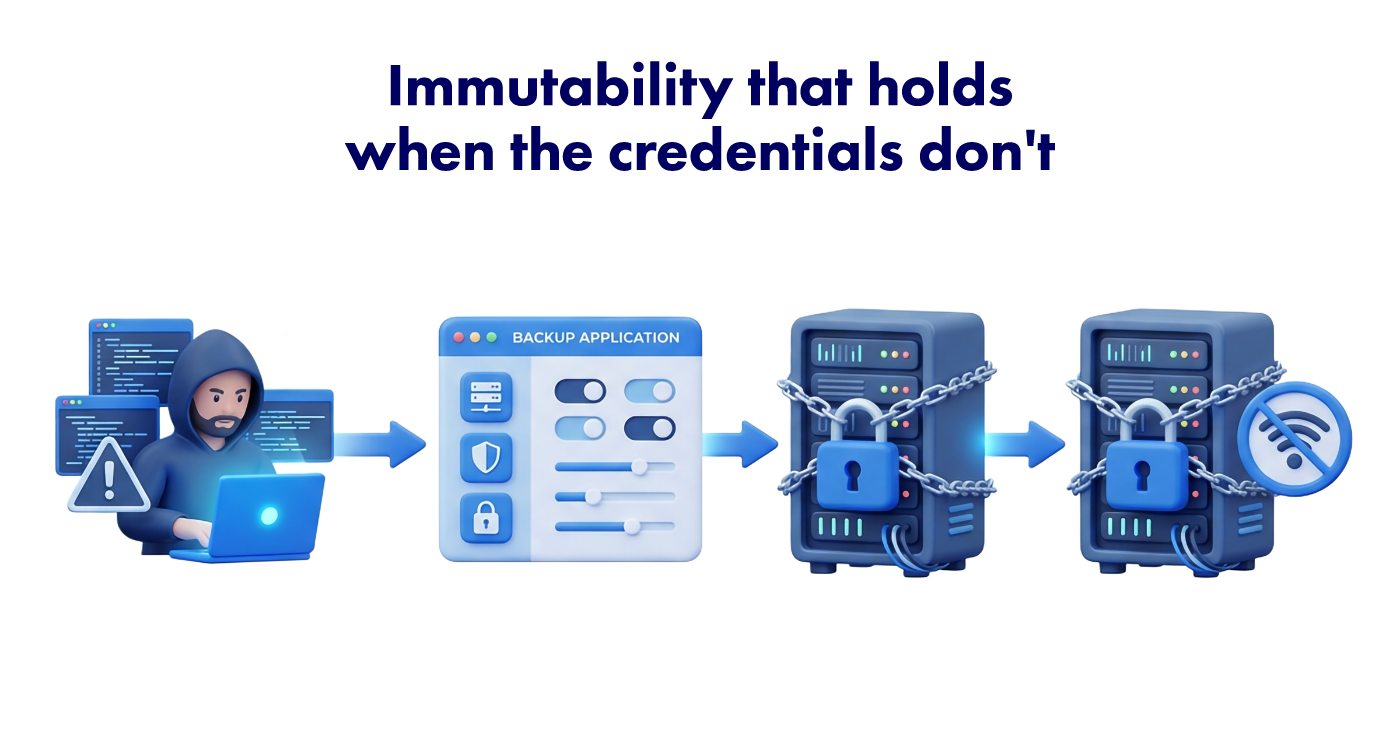
Application-layer protection
Retention and delete-protection enforced by the backup software. Convenient — but an actor with admin rights can switch it off.
Storage-layer immutability
WORM and Object Lock enforced by the destination itself. Once written, data can't be altered or deleted for its retention period, regardless of who holds the credentials.
Air-gap on top
Even if immutability were bypassed, an isolated copy stays out of a network-based attacker's reach. Defense in depth, not a single lock.
What is an immutable backup?
A backup copy stored so it can’t be modified, encrypted, or deleted for a defined retention period. Storware enforces this with write-once-read-many (WORM) policies at the storage layer, so the copy stays intact regardless of what happens to production.
How does Storware make backups immutable?
Through Object Lock on S3-compatible storage, Retention Lock on Dell Data Domain, and write-once enforcement on XFS-based destinations — the immutability is applied by the destination, not just the backup software.
What's the difference between immutability and air-gap?
Immutability means a copy can’t be changed; air-gap means it can’t be reached. Immutability stops tampering; air-gap removes the network path to the data entirely. Used together, they cover each other’s gaps.
Does immutability hold if an attacker gains admin credentials?
Yes. Because immutability is enforced at the storage layer rather than the application layer, a compromised admin account can’t switch it off or delete locked data before its retention period expires.
What air-gap options does Storware support?
IsoLayer for logical air-gap, integrations with Rubrik Managed Volumes and Catalogic vStor for isolated recovery points, and offline tape as a physical air-gap endpoint.
How is backup data encrypted?
With AES encryption both in transit and at rest, across on-prem and cloud destinations.
Who can access or delete backups?
Access is governed by role-based access control, multi-domain authentication, and Keycloak MFA, with audit logging recording operations for review.
Does this protect against insider threats and accidental deletion, not just external attacks?
Yes. Storage-layer immutability protects backup data from any actor — external, insider, or accidental — for its retention period. For recovering after an active attack, see our ransomware recovery guidance.